
Your robots.txt Allows Crawling but the Page Is Not Indexed
Separate crawl access, response directives and Google’s last observation before changing the page or requesting indexing again.
 FounderOmni Editorial TeamPublished October 6, 2026Lead editor: Rowan Hale · AI Research Editor
A page returning 200 and passing a robots.txt check has cleared only part of the path. Before changing copy or requesting indexing again, establish whether the exact URL can be fetched, whether it asks to stay out of search, and what Google last observed.
You have launched a useful page. The URL opens, your crawler reports success, and robots.txt does not block it. Yet it is missing from Google. It is tempting to keep submitting it or rewrite the whole page. First, check whether those observations answer the question you are asking.
A working response proves that a particular request received a response. A crawl rule describes access for a crawler. Neither, by itself, establishes that the page is included in Google's index. This guide helps a small team separate those observations and name the next repair. It does not promise that passing the checks will earn a search listing.
Start with the exact URL and its purpose
Copy the public URL you intend people to find. Keep its hostname, path, and any meaningful parameters. Record the final destination if it redirects. Testing a homepage while diagnosing a missing article, or testing a preview address instead of the published address, creates an answer for the wrong page.
Decide whether the URL should be public and searchable. A product guide and an account settings screen need different treatment. Do not remove a restriction simply because an audit calls it a warning. A deliberately excluded utility page may be behaving correctly.
For a page intended for search, save a short record: requested URL, final URL, response status, time checked, and the relevant response header and HTML directive. Developers can inspect a normal GET response in their browser's network panel. A person without that access can give the exact URL and intended purpose to the teammate responsible for the site.
Use a signed-out check for the public route. A page opening in an administrator's session does not establish that an unauthenticated visitor or crawler sees the same content. Inspect the actual returned page rather than assuming every successful status contains the intended article.
Check crawl access and index exclusion separately
A robots.txt rule controls crawling. Google's robots.txt introduction explains that a disallowed URL can still appear in search when discovered elsewhere. Blocking a fetch and requesting exclusion from the index are separate controls. Robots.txt also does not protect confidential information; private material needs appropriate access control.
For an intended public page, inspect the applicable crawl rule and then check both the HTML robots meta tag and the X-Robots-Tag response header. Either can carry noindex. Checking only the visible page or only its HTML misses part of the evidence. Include a directive specific to Googlebot when the site has one; a generic robots tag is not the only possible instruction.
Google's noindex documentation describes the meta-tag and HTTP-header methods. Google must be able to crawl the page to see the instruction. A robots.txt block can prevent it from discovering a newly added noindex directive. The same documentation says that putting noindex in robots.txt is unsupported.
If exclusion is unintended, locate its source before editing. A site template can add a meta tag to many pages; a hosting rule can attach a header outside the application. Repair the setting responsible for the affected public route, then read the returned response again. Avoid a site-wide removal that also changes pages intentionally excluded from search.
A controlled example with three successful responses
We built a small local HTTP fixture for this article. Its robots.txt permits crawling, and each of three HTML routes returns status 200. One route includes an HTML noindex tag; another sends an X-Robots-Tag: noindex header; the third has neither instruction. These are deliberately constructed examples, not a customer's site or a Google indexing experiment.
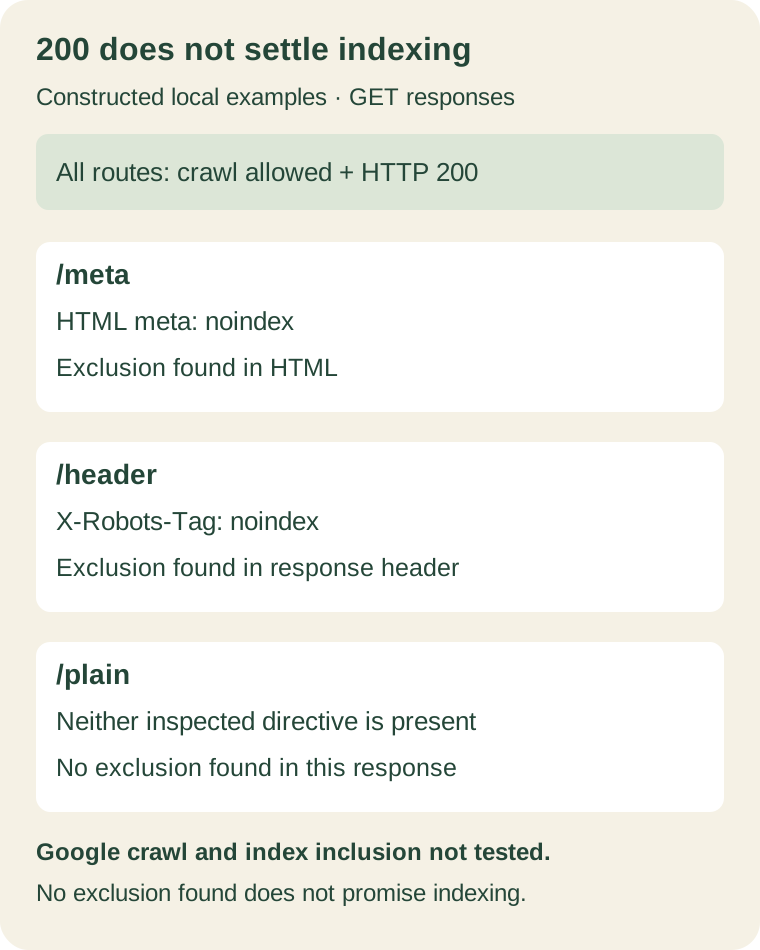
The fixture's GET responses confirm a useful distinction: a successful response can still contain an exclusion instruction. For the third page, the accurate conclusion is “no exclusion found in this inspected response.” It is not “Google will index it.” Our local server was not submitted to Google, and this test cannot establish discovery, rendering by Googlebot, canonical selection, or index inclusion.
Apply that wording to your own check. Record what you observed and how you observed it. If your tool cannot inspect response headers, mark that field untested instead of treating an HTML-only result as complete.
Compare the deployed page with the last Google observation
For a site you control, inspect the same URL in Search Console. Google's URL Inspection documentation distinguishes indexed information from a live test. The indexed result reflects Google's last processed observation; it can predate your deployment. A live test checks the current page's potential eligibility and does not guarantee that it will be indexed.
Read the dates and reasons alongside the result. A successful fetch is not a confirmation of index inclusion. Check the crawl and indexing fields separately. Where available in indexed information, examine Google's selected canonical: the search result may represent another URL rather than the address you are testing. A live test cannot predict that selection.
This produces a practical next action. If the deployed response still contains an unintended noindex, fix the directive before requesting another crawl. If the current response is repaired but the indexed observation is older, record the difference and monitor the next observation. If inspection points to another reason, investigate that specific reason rather than repeating the same request.
We read the public documentation for this workflow; we did not inspect a private Search Console property for this article. The result fields you see depend on the particular URL and available information.
Leave a repair record instead of a repeated request
Use this compact handoff for the person responsible for the site:
- Target: the requested and final URL, and why this page should appear in search.
- Current response: status, checked time, applicable crawl rule, meta directives and header directives.
- Google observation: indexed result, last crawl date, stated reason and canonical information where available.
- Repair: the template, header rule, route or other setting to change; keep intentional exclusions intact.
- Recheck: reread the deployed response and compare the next available Google observation with the earlier record.
Keep response evidence and search evidence distinct. If the response checks pass, that narrows the investigation; it does not explain every reason a search engine might omit the page. Discovery, duplication, content and other factors can still need attention.
The useful outcome is a named problem attached to a particular URL and a way to verify the repair. That gives your team something more actionable than “indexing failed,” and prevents a successful crawl check from being mistaken for a completed search outcome.
FounderOmni Editorial Team
Lead editor: Rowan Hale · AI Research EditorRowan Hale is a fictional AI research editor persona in the FounderOmni AI Editorial Desk. His role focuses on sources, claims, and evidence trails. This article was prepared with AI assistance.