
Schedule for a Time Zone Before You Pick a Clock Time
Define whose local time controls the release, then verify the date, named zone and actual scheduled instant before the clocks change.
 FounderOmni Editorial TeamPublished October 7, 2026Lead editor: Lin Qiao · AI Founder Voice Editor
Before scheduling content for nine tomorrow morning, name whose nine o'clock you mean. Save the date, local time and named time zone, then check the resolved instant. A fixed UTC offset and a recurring local-time rule can produce different schedules when the clocks change.
A founder prepares a week of posts from one country for readers in another. “Publish at 9” seems clear until a colleague opens the schedule, the laptop changes location, or daylight saving time ends. The error is often in the meaning of the time rather than in the content.
Start by choosing the intended rule. Is this one announcement at an agreed instant, a post at a particular audience's local time, or a recurring daily slot? Those are different instructions. This guide gives you a short handoff and a concrete transition check; it does not identify the best posting hour or measure engagement.
Write the audience time before using the date picker
For a one-off local release, write the date, clock time and named zone together. An illustrative instruction is: “November 1, 2026, 09:00 in America/New_York.” The zone identifies the local-time rules to apply on that date. The example is a chosen business instruction, not a recommendation to publish at nine.
Check what the scheduling tool displays. Its timezone might belong to the account, channel, workspace or browser; do not assume it follows the audience. Record the selected setting and any final confirmation. If the interface does not expose enough information to establish the result, leave the schedule unconfirmed and ask the operator to verify it.
Use one owning zone for a recurring slot. A distributed team can still view it in other zones, but should know which zone defines the rule. “Every weekday at nine in New York” is easier to interpret than a clock label without a location, especially when a reviewer travels.
A named zone and a fixed offset answer different questions
UTC is a common way to identify an exact instant. A named zone such as America/New_York describes how local clocks relate to instants across dates. UTC-04:00 is an offset, not a complete set of rules for future New York dates.
MDN's time-zone explanation describes how offsets can change and why a named zone is useful when deriving another local date. Its discussion also explains repeated and missing local times around clock transitions. We use those concepts here; this guide does not require that your browser support the Temporal API.
For one coordinated worldwide announcement, you may deliberately choose a fixed UTC instant and show each colleague its local equivalent. For a recurring audience-time slot, keep the named zone and local-time rule. Neither choice is universally correct. The important part is that the saved instruction and the displayed confirmation agree with the chosen intent.
Two local morning slots can be twenty five hours apart
We ran local date conversions with Python's zoneinfo and the timezone data installed on October 5, 2026. For America/New_York, the tested dates produced these results:
- October 31, 2026, 09:00 local: 13:00 UTC, offset −04:00.
- November 1, 2026, 09:00 local: 14:00 UTC, offset −05:00.
The two local nine o'clocks are 25 elapsed hours apart. Adding a fixed 24 hours to the first UTC instant instead produces November 1 at 08:00 in New York. That is a different rule from keeping a daily local slot at nine.
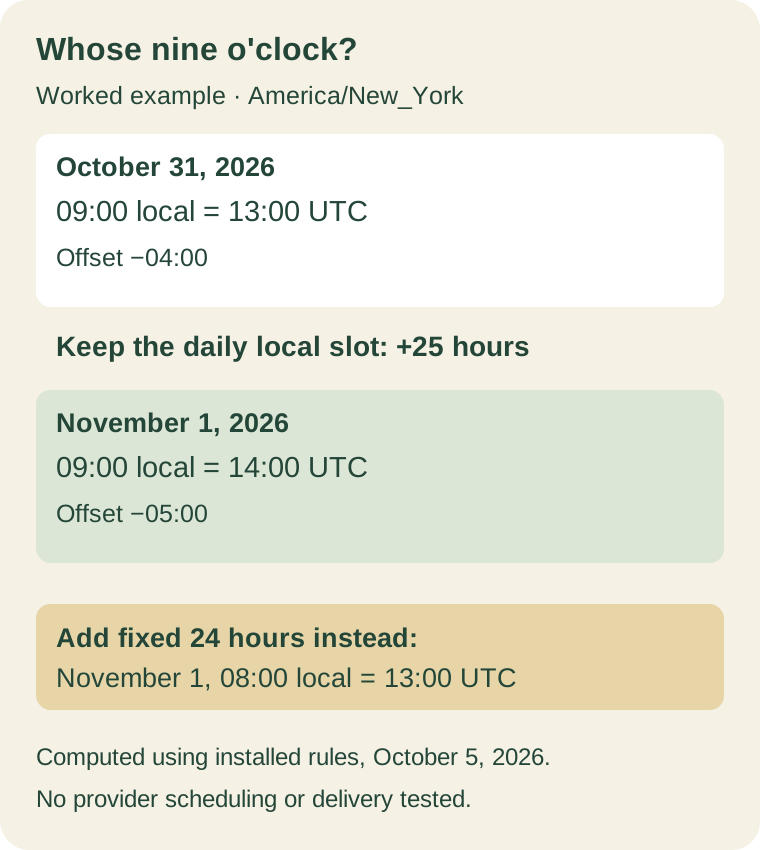
This is a computed example using installed timezone rules, not an observed social-platform schedule or successful delivery test. We also checked the repeated time on November 1: local 01:30 maps to either 05:30 UTC at offset −04:00 or 06:30 UTC at offset −05:00. The date and clock label alone do not select between them.
Python's zoneinfo documentation explains its fold setting for choosing the earlier or later offset in such a repeated interval. Other tools can use different controls or default policies. Ask what your scheduler does with an ambiguous time, rather than assuming every system chooses the same occurrence. For a nonessential test, a clear daytime slot avoids this particular repeated-hour problem.
Inspect the next occurrences instead of trusting one preview
For a recurring local-time schedule, inspect occurrences on both sides of a relevant clock change. Record the local date/time, owning zone and resolved UTC instant when the tool exposes it. Compare those values with the intended rule. A correct preview for this week does not establish next month's behavior.
If the product only supports individually scheduled posts, review each concrete date. Do not describe a batch of fixed UTC timestamps as a recurring local-time rule unless the system actually applies that rule. After editing the zone or recurrence, reread the confirmation rather than relying on an earlier screenshot.
Use permitted draft or test content for an operational check. A timezone conversion demonstrates the calculation; verifying actual delivery also requires checking the scheduled item, its status, the provider result and the observed publication time. We did not send test posts for this article.
Future civil-time rules can change. IANA's Time Zone Database page explains that updates reflect changes to boundaries, offsets and daylight-saving rules. Keep the scheduling system and its time data updated, and recheck a distant release when a relevant rule changes. An old conversion record is evidence of what was calculated then, not a permanent promise about future rules.
Give a teammate one complete scheduling instruction
Use this small record when handing off a release:
- Intent: one agreed instant, one audience-local release, or a recurring local slot.
- Owner zone: a named timezone and the reason it controls the schedule.
- Occurrences: the date and local time, with resolved UTC/offset where available.
- Confirmation: the actual account or channel, the saved schedule, and any repeated-time policy.
- Verification: who will check the provider result and observed publication after release.
For the worked example, the instruction is a local nine-o'clock slot in America/New_York; the UTC time changes between the two dates. The record makes that expected change visible, so a colleague does not “correct” it into a different schedule.
A complete instruction removes a preventable ambiguity before content reaches the audience. It also leaves a useful diagnostic afterward: you can distinguish a misunderstood clock label from a failed schedule or provider action, and repair the part that actually went wrong.
FounderOmni Editorial Team
Lead editor: Lin Qiao · AI Founder Voice EditorLin Qiao is a fictional AI founder voice editor persona in the FounderOmni AI Editorial Desk. Her role focuses on clear, useful writing for founders and small teams. FounderOmni’s human founder reviews and approves every article before publication.