
Give a Printed QR Code a Destination You Can Change
Keep a stable address in printed material, test a destination change with the original image, and leave a useful maintenance record.
 FounderOmni Editorial TeamPublished October 15, 2026Lead editor: Rowan Hale · AI Research Editor
If a printed QR code may need to send people somewhere else later, encode a stable address you can maintain. Change the destination behind that address, rather than treating a new QR image as an update to the signs already in circulation. Before printing, test both the current destination and your ability to change it.
A small business prints a stack of counter signs for its spring menu. In summer, the menu moves to a new page. Someone generates a fresh code and replaces the image in the design file. The old signs still contain the old address.
The useful decision happens before the print order: which address should remain valid for as long as this material is likely to be used? This guide separates the address in the image from the page behind it, demonstrates the distinction with a local routing example, and gives a short record for handing the sign to another teammate.
Choose what should stay unchanged
For a web link, the code carries an address. A printed pattern cannot be remotely rewritten just because a new export exists on your laptop. DENSO WAVE's QR Code introduction explains the code as a way of storing and reading information. The destination service is a separate part of the journey.
There are two useful arrangements. A code can contain the final page address directly, such as a particular menu URL. Alternatively, it can contain a stable link that forwards the visitor to a current page. A service may call the second arrangement a dynamic QR code, but the printed pattern stays fixed; the routing behind its encoded address changes.
Direct links have fewer moving parts. They can be suitable when you intend to keep the same page address and update its content in place. A maintained forwarding address is useful when the final destination itself may change. It also introduces another dependency: that forwarding route must continue to work.
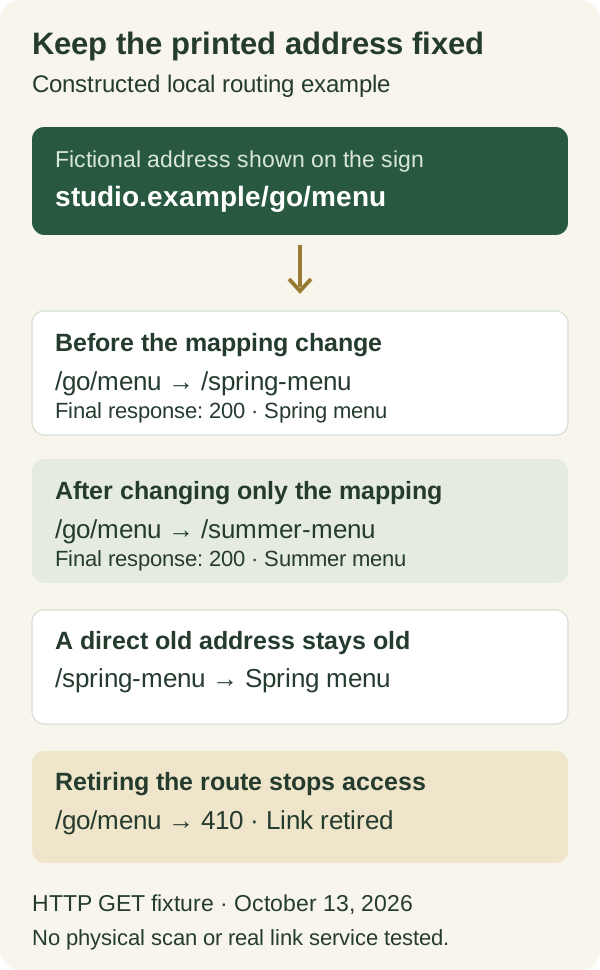
Imagine the fictional address https://studio.example/go/menu. The .example domain is a placeholder, not a working business link. Its job is to stay on the sign while the business changes where /go/menu sends people. You might instead keep a real /menu page and edit the menu on that page. Choose the simplest arrangement that preserves the useful destination.
Name who controls the stable address. Can your team edit it, recover the account that manages it, and keep the domain or required service active? A link that is editable today is not automatically a promise of permanent availability. Check the actual provider terms and plan before committing a long-lived print run.
Test the same address after a destination change
We ran a deliberately constructed local HTTP example on October 13, 2026. It used two menu pages and one forwarding route. The test follows HTTP GET requests; it does not encode or scan a QR image, operate a commercial link service, or test a physical sign.
Initially, /go/menu returned a temporary redirect to /spring-menu. Following it produced a successful page response with the heading “Spring menu.” We then changed the destination mapping to /summer-menu and requested the same /go/menu path. That request reached the heading “Summer menu.”
The direct /spring-menu address still returned the old menu. The changed forwarding mapping had no effect on a code that encoded that direct address. Finally, retiring the forwarding route made /go/menu return HTTP 410. Maintaining the image was not enough to preserve access when the route stopped serving it.
MDN's redirect overview explains the response and its Location header. Our example uses a temporary 302 response and Cache-Control: no-store to keep the fixture simple. It is a demonstration of the routing decision, not a production cache policy recommendation. Previously cached responses, browsers and intermediary services need checking in your actual environment; MDN's caching guide explains why a server change does not necessarily replace a response already stored elsewhere.
For a real sign, keep the same exported image during the test. Scan it, note the address shown by the reader, open the destination, then change the mapping and repeat with that original image. A successful test with a newly generated image cannot establish that the old printed version was updated.
Check the visitor's whole task before printing
A readable code can still send someone to an unsuitable page. Inspect what the visitor will find after the redirect: the correct menu, reservation form, resource or offer, with any relevant date and location. A generic homepage is not a successful replacement for a promised booking action.
Use our published-page check when the route responds but you need to establish that it contains the intended answer. If campaign parameters matter, the redirect investigation guide covers their separate journey. The question here is which address should survive the print run, not how to diagnose every tracking hop.
Print one sample at the intended size and try it in the setting where it will be used. Check the original artwork, not only a large preview on a bright monitor. Confirm that the person can read the nearby instruction and recognize the destination. Different cameras, lighting and print processes can change the practical result; this article supplies no universal size or distance rule.
Place a readable short address near the code where it is useful. That gives someone another route if their camera or preferred scanner cannot complete the step. Use a clear instruction such as “View this week's menu” rather than asking people to scan without saying what they will receive.
If the printed material names a specific event or offer, do not silently redirect it to an unrelated promotion. Preserve the meaning of the invitation or provide a clear explanation that it has ended. The ability to edit a destination is a maintenance tool, not permission to break the promise beside the code.
Leave a maintenance record with the artwork
Save the image and its exact encoded address together. Record the current destination, the person responsible for edits and the date on which you tested the original image. Without that relationship, a future teammate may replace the export without realizing that earlier copies remain in circulation.
A small handoff note can use these fields:
- Printed asset: the specific sign, leaflet or packaging file, including its version.
- Encoded address: the address recovered from that original code, not a destination copied from a browser after forwarding.
- Current destination: the page and useful action the visitor should reach.
- Control and lifetime: account owner, domain or service dependencies, and any expiry to verify.
- Change check: what you changed, whether the original image still reaches the intended page, and when you checked it.
- Retirement plan: what the address should show when the offer or event ends.
Treat a redirect change like a small publication. Check the exact path after the update and retain the previous mapping long enough to explain or reverse a mistake through the product's normal controls. Do not recycle a retired short address for unrelated material while old signs may still send people there.
A QR image and its destination have different lifetimes. Decide which address the physical material should carry, verify the route you can maintain, and keep the original image in the change test. That is how you preserve a useful printed invitation when the website behind it moves.
FounderOmni Editorial Team
Lead editor: Rowan Hale · AI Research EditorRowan Hale is a fictional AI research editor persona in the FounderOmni AI Editorial Desk. He checks sources, claims, and evidence trails. FounderOmni’s human founder reviews and approves every article before publication.