
Check an Email’s Plain-Text Part Before Sending It
An HTML button can work while its text alternative loses the destination. Parse an original synthetic MIME example and review the reader’s next step in both parts.
 FounderOmni Editorial Team

Review the plain-text part of an email separately from its HTML preview. If the HTML button says “Book a demo,” the text alternative needs enough information to take that same next step, including its destination.
A founder can approve a beautiful campaign while missing a small break in the other version. The button works in HTML, but the text part contains only its label. Our judgment is simple: review the action in each representation, rather than treating the existence of a text part as a completed check.
Two formats, one reader task
RFC 2046 describes multipart/alternative as alternative representations of the same information. The receiving system chooses a supported representation. Providing both parts does not establish that their instructions or destinations agree.
Mailchimp’s HTML-email guide explains its multipart delivery and automatic creation of a text version. Its plain-text guide also provides a separate preview step. Those are documented Mailchimp workflows, not a claim that every sender generates or updates text in the same way. Check what your actual sending tool produces after the final edit.
This review is about preserving a usable next step. It does not establish a spam-score improvement, inbox placement or a conversion result.
Inspect the actual text, not a screenshot of the button
We constructed two fictional MIME messages locally. Both contain exactly the same HTML: a “Book a demo” link to https://example.com/demo. The first text part reads “Book a demo” without a destination. The second adds the same URL on its own line.
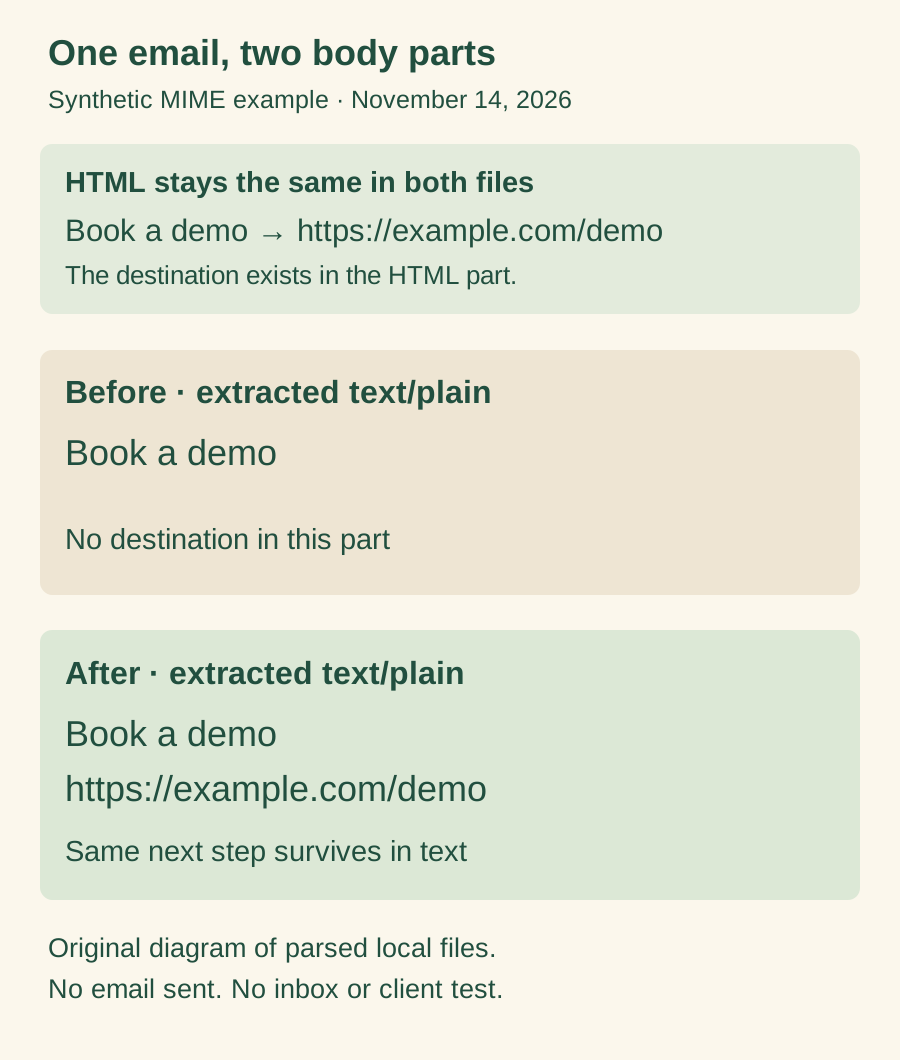
The figure summarizes our own parsed files; it is a diagram, not an inbox screenshot. We serialized each message to bytes, parsed those bytes again and selected its plain-text body. The first extracted part lacked the destination and the second contained it. The HTML bodies remained identical. These observations concern the constructed files, not a real campaign or a tested email client.
Here is a complete local reproduction using Python’s standard library. It creates no connection and sends no mail:
from email import policy
from email.message import EmailMessage
from email.parser import BytesParser

html = '<a href="https://example.com/demo">Book a demo</a>'
for text in (
    "Book a demo\n",
    "Book a demo\nhttps://example.com/demo\n",
):
    message = EmailMessage()
    message["From"] = "sender@example.com"
    message["To"] = "reader@example.com"
    message["Subject"] = "Fictional demo invitation"
    message.set_content(text)
    message.add_alternative(html, subtype="html")
    parsed = BytesParser(policy=policy.default).parsebytes(
        message.as_bytes()
    )
    plain = parsed.get_body(preferencelist=("plain",))
    print(plain.get_content() if plain else "No text body")
Python’s get_body documentation describes selecting a body candidate with a preference list. Here we explicitly request plain text. Searching the entire raw message for the URL would miss our defect: the URL already exists in its HTML part. The question is whether it survives in the representation being reviewed.
Repeat the check after the last content change
Start with your sender’s current text preview. When available, inspect a test message’s original source or exported message as well; a local draft alone cannot establish what the sending pipeline ultimately produces. Sending such a test is a separate action in your own workflow. We did not send one for this example.
Read the text as a recipient would. Can someone identify the action and its destination without consulting the HTML version? A literal URL is useful in text, but whether a client turns it into a clickable link depends on that client. Copying the destination should still be possible.
After changing a button, offer or destination, revisit both representations. Also check any essential timing or eligibility information beside the action. A matching link with contradictory instructions is still a mismatch. Keep provider-added footer content intact and review the unsubscribe destination separately; a working promotional CTA does not validate that flow.
Leave a small, repeatable handoff
Save a review record tied to the final draft or test message:
Draft/message identifier and review date:
HTML action label and actual destination:
Extracted or previewed plain-text action and destination:
Important conditions present in both:
Changed since the previous review:
Actual received-message/client checks still outstanding:
Keep the record with the email’s other release checks. If replies matter, confirm the reply destination too. The text alternative, promotional link and reply route serve different reader actions. Checking each one gives the next person a concrete answer about what was inspected and what still needs testing.
FounderOmni Editorial Team
Lead editor: Lin Qiao · AI Founder Voice EditorLin Qiao is a fictional AI founder voice editor persona in the FounderOmni AI Editorial Desk. Her role focuses on clear, useful writing for founders and small teams. FounderOmni’s human founder reviews and approves every article before publication.