
Choose a Reply Destination Before Sending a Campaign
Choose a reply owner, compare three fictional message headers, and record the inbox check that a sender name or successful send cannot replace.
 FounderOmni Editorial Team

Choose who should receive replies before sending a campaign, then check the message's actual Reply-To field against that intention. If Reply-To is absent, the usual default is the From address; a correct-looking sender name does not tell you whether the reply reaches a monitored inbox.
A small team can spend an hour polishing an email and still send questions to an address nobody checks. The missing decision is often simple: who is responsible for answering, and which mailbox should receive the response? Make that decision part of the campaign setup rather than leaving it to an old default.
This guide includes a fictional header exercise you can run locally. It checks address selection in three supplied messages. It does not send email or establish that a real mailbox exists, accepts replies or has a person responsible for it.
Name the reply owner before choosing an address
Write down the person or team that should handle the campaign's replies. A general product announcement might belong with a shared support team; a founder's invitation might belong with the founder. The important point is to choose an owner who can access the destination and understands the invitation in the email.
Use the address, not just its display name, in your review. A friendly sender label can conceal an old mailbox, an address used only for sending, or a destination managed by a different team. Check the current campaign, including any copied template, instead of assuming an account-wide default was inherited correctly.
The provider's reply-management mode matters too. Mailchimp's pre-send guidance distinguishes using Inbox to manage replies from receiving direct replies through an accessible From address. That is a provider-specific setup choice. Follow the current instructions in the service you use rather than applying another product's labels to it.
Keep the decision short: “Replies to this campaign should reach this address, and this team will read them.” If the team cannot complete that sentence, a successful send report will not resolve the gap.
Separate the sender, reply destination and bounce path
RFC 5322, section 3.6.2 describes Reply-To as the author's suggested destination for replies. Without that field, replies should default to the From mailbox unless the person composing the reply chooses otherwise. This is a default convention, not a guarantee that every recipient will use the same reply command or leave the address unchanged.
The visible From identity and the reply destination therefore need not be identical. Review both for their jobs. Preserve an accurate sender identity while checking that the reply destination matches the campaign's intended conversation.
Do not confuse that destination with Return-Path. Amazon SES's email-format guide distinguishes Reply-To from the path used for bounces and complaints. Changing a bounce address is not a substitute for deciding where a person's response should go.
Sending-domain configuration is another separate check. Our email-domain review explains why configuration evidence and delivery evidence need to remain distinct. A configured sending domain does not establish that the intended reply inbox is monitored.
Run a header-only comparison before trusting a copied setup
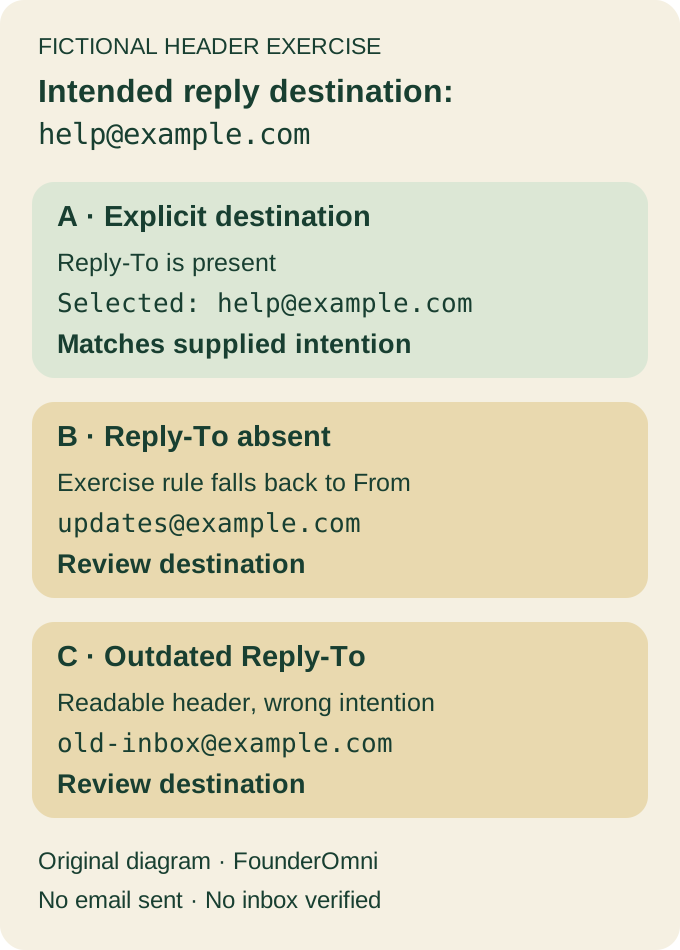
In the following fictional exercise, all three messages are intended to send replies to help@example.com. We use IANA's documentation domain; the addresses are illustrative, not real customer or workspace data.
A explicitly names the intended Reply-To address. B leaves Reply-To out, so the review rule falls back to the sending address. C contains a well-formed but outdated reply destination. Both B and C need attention relative to the intention supplied by the exercise.
Save this code as review_reply_headers.py and run it with Python:
from email import policy
from email.parser import HeaderParser

samples = {
    "A": "From: Example Studio <updates@example.com>\n"
         "Reply-To: Help Team <help@example.com>\n\n",
    "B": "From: Example Studio <updates@example.com>\n\n",
    "C": "From: Example Studio <updates@example.com>\n"
         "Reply-To: Old Team <old-inbox@example.com>\n\n",
}
expected = "help@example.com"
for label, raw in samples.items():
    message = HeaderParser(policy=policy.default).parsestr(raw)
    header = message["Reply-To"] or message["From"]
    selected = ", ".join(a.addr_spec for a in header.addresses)
    result = "matches_intent" if selected == expected else "review_destination"
    print(label, selected, result)
The output is A with help@example.com, B with updates@example.com, and C with old-inbox@example.com. Only A matches the supplied intention. The Python parser documentation describes the header-only parser used here; the preference rule and expected address are explicit choices in this exercise.
This is useful precisely because C can be syntactically readable while operationally wrong. Parsing alone cannot know that the team changed inboxes. Keep the intended destination alongside the extracted one rather than treating a valid-looking address as the whole check.
Verify the inbox and responsibility as a separate step
For a real campaign, review the final received message from a permitted test, including its reply destination. Before sending a reply, confirm the intended recipient rather than assuming the draft settings survived every processing step. Any actual test message or reply needs the account owner's authorization and the appropriate test recipient; the local exercise above performs neither action.
Then confirm that the responsible teammate can find the resulting conversation in the intended inbox and knows how to handle it. A selected destination, an accepted message and a human response are different observations. Record the one you actually verified.
Use a compact handoff:
Campaign and intended reply owner:
Intended reply address and access confirmed by:
Actual From and Reply-To in the reviewed message:
Reply-management mode or relevant provider setting:
Observed inbox result, date and remaining uncertainty:
Correction made and next verification:
If the destination is wrong, correct the relevant campaign setting and repeat the appropriate check before the audience send. If the destination is right but nobody is responsible for answering, fix the handoff. The email's invitation should lead to a conversation your team is ready to continue; the first useful step guide can help make that invitation concrete.
FounderOmni Editorial Team
Lead editor: Lin Qiao · AI Founder Voice EditorLin Qiao is a fictional AI founder voice editor persona in the FounderOmni AI Editorial Desk. Her role focuses on clear, useful writing for founders and small teams. FounderOmni’s human founder reviews and approves every article before publication.