
An Email Domain Check Is Not a Delivery Test
Read MX, SPF, DMARC and an unchecked DKIM selector as different observations. A real public check shows what to verify before making a delivery claim.
 FounderOmni Editorial TeamPublished October 18, 2026Lead editor: Rowan Hale · AI Research Editor
An email domain check can show published DNS records. It cannot establish that a particular message was authenticated, delivered or placed in an inbox. Read each result as an observation about a named domain at a specific time, then choose the next check that answers your actual sending question.
Before a campaign, a founder runs a checker and sees several positive results. It is tempting to treat that screen as permission to announce that email is ready. But receiving mail, publishing a sender policy, signing a message and reaching a recipient are different jobs.
We ran FounderOmni's public Email Domain Checker for founderomni.com on October 16, 2026. We left the optional DKIM selector empty. The result supplies a useful example of how to read configuration evidence without turning it into a delivery claim. No email was sent and no DNS setting was changed.
Read the result you actually requested
Record the domain and the inputs before interpreting the badges. A root domain and a sending subdomain need not publish the same records. A check without a DKIM selector is also a different request from a check of a provider's specific selector.
Our result was marked as checked at 10:00 a.m. New York time. The interface explained that checks may reuse a result from the last five minutes. That timestamp describes this observation; it is not a promise that every resolver worldwide sees the same information at that instant.
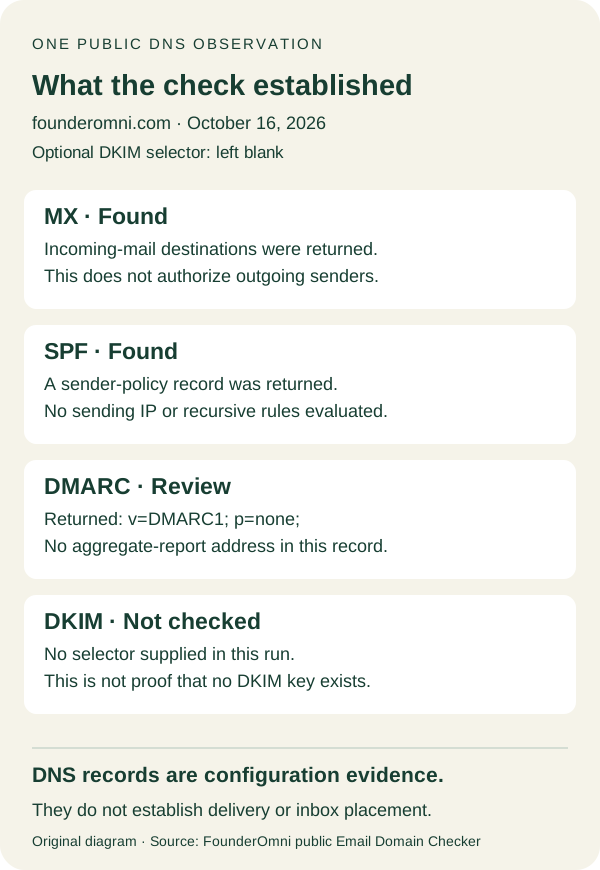
The displayed results were:
- MX: Found. The response listed
mx1.spacemail.comandmx2.spacemail.comas incoming-mail destinations. - SPF: Found. The returned text began with
v=spf1and included two provider references before its final~all. - DMARC: Review. The returned record was
v=DMARC1; p=none;. - DKIM: Not checked. The explanation was “No selector supplied.”
Each row answers its own question. “Not checked” is a statement about missing input in this run, not proof that the domain has no DKIM key. “Found” establishes that the tool obtained a matching record, not that the sender and every message have passed a full protocol evaluation.
The diagram below summarizes the observed rows and their limits. It is an original explanation of this run, not a reproduction of the tool interface. You can also open the actual captured result detail.
Keep a lookup failure separate from an absent record too. If a request could not finish, the useful next action is to investigate that observation or try again through the normal controls. Replacing an unavailable result with “missing” would create a configuration problem that has not been established.
Separate a published record from a working message
MX records concern where incoming mail should go. They do not authorize an outgoing campaign sender. Use the result to compare your receiving setup with the provider you expect, rather than treating it as an authentication badge for all mail from your brand.
SPF publishes authorization information for the relevant sending identity. The SPF specification describes checks involving the SMTP envelope sender and sending IP address. Finding the text is one observation; evaluating a real sender with the correct inputs is another.
Our public checker explicitly said it had not evaluated the sending IP or executed the recursive SPF rules. The displayed provider references therefore cannot establish that every service our team uses is authorized, that the complete policy is valid for every path, or that a particular message passes. Compare the actual provider setup before deciding what needs changing.
DKIM requires a different piece of context. Its selector mechanism supports different public keys within a signing domain. The provider's actual selector matters. Guessing one and finding no record would not establish that every possible selector is absent.
We deliberately supplied no selector in this example. The next step is to obtain the correct value from the sending provider or an authorized message's signature information. Even a later successful key lookup would show published key material; it would not verify that a particular message was signed correctly. Private signing keys do not belong in a public checker.
DMARC connects authentication with the visible sending domain and a domain owner's policy. In the documented policy values, none requests no specific delivery action. It is not a request to reject failing messages, and its presence alone does not establish aligned authentication.
The returned record also contained no rua destination for aggregate reports. Calling a policy “monitoring” should not become a claim that your team is receiving reports: report destinations and collection need their own verification. We did not inspect any private reporting service or mailbox in this run.
Do not replace a monitoring policy with enforcement merely to remove a review badge. Review the legitimate sending paths and the evidence with whoever manages the domain. A configuration change should have an operational reason beyond making a summary look cleaner.
Choose the next check from the question you need answered
Start with a precise question. “Did our DNS edit appear in this lookup?” can be investigated with the exact domain, record name, returned value and check time. “Does our campaign authenticate?” requires evidence about the actual sending path and messages. “Did the recipient receive it?” requires delivery or recipient-side evidence.
For an authorized message test, keep the sender, recipient, provider, time and relevant authentication result together. A provider's acceptance event, a receiving server's response and the recipient seeing the message are different observations. Do not convert one into all three or assume that acceptance proves inbox placement.
If a message does not arrive as expected, preserve the failure details instead of rerunning unrelated DNS checks until a green result appears. Inspect the provider's actual event or response and the intended recipient's authorized evidence. That gives the investigation a specific missing step.
A small handoff record can contain:
- Question: the configuration, authentication or delivery fact you need to establish.
- Scope: exact domain, any supplied selector and the sending path where relevant.
- Observation: returned records or actual message evidence, with its timestamp.
- Unknown: the part the chosen check did not evaluate.
- Next action: the provider setting, specific lookup or authorized message result to inspect next.
This record helps a small team avoid passing a broad “email is working” conclusion between people who checked different things. Keep private message headers, addresses and account details in your normal secure workflow; share only the information needed for the investigation.
Once the sending path is verified, the message itself still needs to help its reader. Our welcome-email guide covers the separate task of making the first useful action clear. Neither clear copy nor a published DNS record substitutes for evidence about a real message's journey.
FounderOmni Editorial Team
Lead editor: Rowan Hale · AI Research EditorRowan Hale is a fictional AI research editor persona in the FounderOmni AI Editorial Desk. He checks sources, claims, and evidence trails. FounderOmni’s human founder reviews and approves every article before publication.