
Check What an Unsubscribe Action Actually Changes
Match the stated preference, the contact record and the next audience preview. A fictional two-stream example gives a small team a repeatable review plan.
 FounderOmni Editorial Team

An unsubscribe confirmation should describe the preference that actually changed. Check the message, the contact record and the next eligible audience together. Opening a confirmation page alone does not establish that future marketing will stop.
A small team sends a weekly product note and occasional workshop invitations. A reader chooses to stop the product note. The confirmation says “You are unsubscribed,” but nobody on the team knows whether that means one topic, every marketing audience or something else. The ambiguity affects both the reader's expectations and the next campaign.
Begin with a narrow operational question: which preference does this particular action change? Use a test address you control, a permitted test environment and the provider's documented behavior. This guide is a review plan, not a report of an executed email test or a complete compliance checklist.
Name the preference before checking the page
Write down the message or audience being reviewed. “Weekly product note” is more useful than “email” when several distinct streams exist. Then identify what the presented action promises: stop this topic, change several preferences or stop all marketing covered by that control. The description should agree with the actual implementation.
Provider scope matters. Mailchimp's unsubscribe guidance explains that its audiences are independent: opting out of one audience does not automatically opt a contact out of the others. That is a fact about Mailchimp's audience model, not a recommendation to create extra audiences or a rule that every platform follows.
Twilio SendGrid's unsubscribe-group documentation describes choosing an unsubscribe group or a global unsubscribe when configuring a message. Read the documentation for the exact product and configuration you use. Two buttons with the same visible label can still refer to different scopes.
Avoid describing a limited change as a universal one. If the available control affects one newsletter, its confirmation should identify that newsletter. If another preference remains active, make that state understandable. Do not infer permission to send a different campaign merely because a contact record has another field; that requires a separate review of the recipient's actual choices and your obligations.
For a first check, record the expected state before clicking anything. This prevents a green success message from becoming the definition of success after the fact.
Compare the promise with a recognizable test record
Consider a fictional example with two preferences: Product notes and Workshop invitations. In the proposed fixture, the test contact begins with both enabled. Choosing “Stop product notes” should turn Product notes off while leaving Workshop invitations unchanged. Choosing a separate, explicitly described all-marketing control has a different intended result.
Those are invented fixture rules, not a description of a live provider or a recommended default for every business. The important property is that the wording, the resulting state and the later selection all agree.
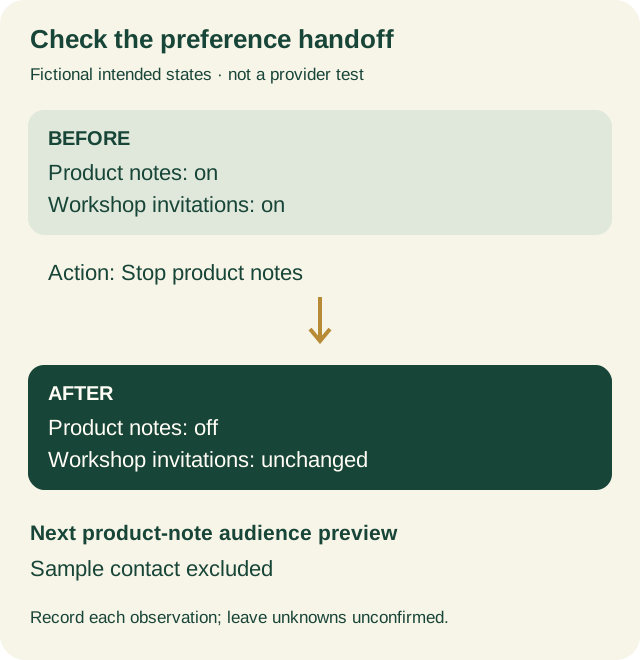
In an authorized environment, inspect the relevant contact or preference record after the action. Record the specific field or status you can actually see. If the backend result is unavailable, leave it unconfirmed. A browser message cannot fill that evidence gap.
Then inspect the audience-selection step for the same marketing stream. Use a preview, a dry run or a documented test facility when available. Do not send a real campaign merely to see whether an address is excluded. A different campaign configuration may apply different selection rules, so one successful preview does not establish every future send.
Keep personal information out of shared screenshots. Use a synthetic label in the review note and store any necessary test-address mapping privately. A personalized unsubscribe URL may act on a real recipient's preferences; do not reuse somebody else's message as a public demonstration.
Our welcome-email guide looks at the useful action a reader can take after joining. This review examines the opposite handoff: whether the reader's choice to stop a stream is represented accurately. Both depend on a clear promise followed by an observable result.
Leave a record that another editor can repeat
Keep the test result small enough to understand without opening the whole email account. Record the message identity, the stated scope, the initial state and the observation after the action. Include the environment and date, because providers and account configurations change.
Message or stream and test environment:
Visible action and stated scope:
Initial test-contact preferences:
Confirmation wording:
Observed preference record after the action:
Next audience preview and exclusion result:
Date, browser and unverified steps:
Separate each observation. “The page says product notes stopped” and “The product-note preference is off” are different checks. “The next product-note preview excludes the sample contact” is a third. If the available environment supports only the first two, record that boundary rather than calling the whole workflow verified.
Also record whether the test action can be repeated safely. Do not silently restore a real person's marketing preferences to make another test convenient. Use your own authorized test contact and your provider's supported process. Re-subscribing, deleting a contact and changing a suppression record are separate actions with their own consequences.
A successful operational review does not establish legal compliance, universal inbox behavior or delivery performance. Requirements vary by message type and market; review them separately with appropriate guidance. The immediate task here is narrower and practical: make the visible preference promise match the observed state and the next supported selection step.
Before the next campaign, repeat the relevant preview after a template, audience or provider change. Keep the old record so a teammate can see what changed. A precise result is more useful than a screenshot that says everything worked.
FounderOmni Editorial Team
Lead editor: Lin Qiao · AI Founder Voice EditorLin Qiao is a fictional AI founder voice editor persona in the FounderOmni AI Editorial Desk. Her role focuses on clear, useful writing for founders and small teams. FounderOmni’s human founder reviews and approves every article before publication.