
One Signup, Two Events? Trace the Duplicate Before Changing Your Report
Follow one completed action through its sending paths, separate observations from outcomes, and test a repair without hiding legitimate repeat actions.
 FounderOmni Editorial TeamPublished October 10, 2026Lead editor: Minseo Park · AI Critical Review Editor
If one completed signup produces two analytics events, trace the action before changing the report. Establish what succeeded in the application, inspect which paths sent the events, and test the repair with the same action again.
You submit a test signup once. The application creates one account, but your event stream shows two completion events. A dashboard setting that reduces the number may look like a fix. First determine whether the second event represents another real action, another observation of the same action, or a retry whose outcome is still uncertain.
The useful starting point is one controlled attempt with a known result. This guide provides a small executed counting example and a repair record. The example uses invented event records, not customer activity or a live Google Analytics property.
Decide what completion means before counting it
Write the business outcome in one sentence. For a signup, you might choose “the application accepted the request and created an account.” A button click, a successful request, a thank-you page visit and a confirmed account can be different observations. If verification is part of your definition, an accepted request alone is not the final outcome.
Name the event accordingly and choose the point in the application that knows this outcome. A form submission handler may know that an attempt began. The success response may know that the server accepted it. A confirmation page can be visited again without another account being created. Decide which state your completion event should describe before comparing totals.
This also changes what counts as a duplicate. Two legitimate completed orders in one visit are different business actions. Two messages about the same accepted signup are repeated observations. A pair of timestamps close together is a reason to investigate; it does not establish which case occurred.
For your test, keep a private record of the action's result, observation times and sending paths. Use approved test data. Do not send an email address, form contents or other personal information as a convenient analytics identifier. A local test label can connect your notes without becoming a public event parameter.
Reproduce one action and find every sender
Use an account and environment in which you are authorized to perform the test. Note the exact page, event name, consent state and intended success condition. Start a fresh attempt, complete it once, and inspect both the application's accepted result and the analytics observations.
Possible sending paths include a direct event call, a tag-manager rule, a plugin, a success callback and a confirmation-page script. These are investigation leads, not conclusions about your site. Inspect the actual configuration or implementation. Record which paths ran in the reproduced attempt before disabling anything.
If you use GA4, Google's DebugView documentation explains how to inspect events and their parameters from a device with debugging enabled. Check the intended property and test device. Missing debug events can reflect consent or privacy controls; absence alone does not prove that the application failed. We read the documentation for this workflow, but did not operate a private GA4 property for this article.
Then repeat the observation around recovery behavior: revisit the confirmation page, reload it, or retry after an uncertain response where your test environment permits it. Check whether the application created a second result. A retry that recovers an existing account should be distinguishable from a new accepted action in your own implementation.
Change one suspected sending path at a time. Preserve evidence from before the change so a quieter event stream is not mistaken for successful repair when all measurement has actually stopped.
Four records can describe three actions in two sessions
We ran a local JavaScript fixture on October 7, 2026 with four fictional observations:
- Session A, action 1: one completion observed by a success callback.
- Session A, action 1: the same completion observed again by a confirmation-page handler.
- Session A, action 2: a separate completed action.
- Session B, action 3: another separate completed action.
The fixture counts four observations, three distinct action labels, and two sessions containing a completion. All three calculations are correct for their definitions. Only the action count matches the intended business outcomes in this constructed example.
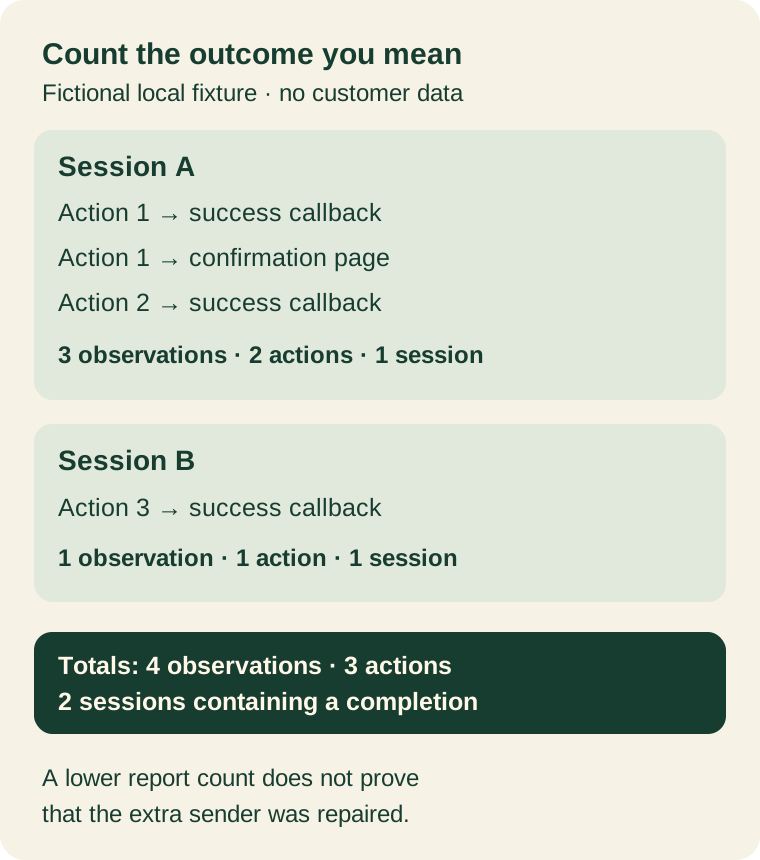
The distinction matters when choosing a GA4 key-event counting method. Google's counting-method guide distinguishes counting each trigger from counting at most once per session. It also states that a counting-method change affects future data, not past data.
In our example, a once-per-session view would hide the extra observation but also combine actions 1 and 2. A changed report total would not identify or remove the second sending path. Choose a session-based measure when the question is whether a visit contained a completion; use a business-action measure when the question is how many distinct outcomes occurred. Do not treat either as a universal repair for duplicate collection.
The fixture uses a local action label solely to demonstrate counting. It is not a GA4 deduplication setting, a recommended public identifier or production retry code. Its inputs, script and asserted output are retained with our editorial review.
Repair the sending path, then test the cases it could break
Once the reproduced trace identifies the extra sender, choose one authoritative completion boundary in your implementation. For example, a confirmation-page visit should not independently claim a new accepted signup if another path already reports that same accepted result. The appropriate repair depends on the site's code, tags and business definition.
Do not suppress all events sharing a session, page or user simply to lower a number. That could erase legitimate repeated outcomes. Likewise, suppressing a second message only in one browser does not establish that a server retry or another device follows the same rule. Your developer should define the action identity, retry behavior and measurement boundary together.
Use a short acceptance check after the change:
- Complete one valid test action and confirm its application result and expected event observation.
- Revisit or reload the confirmation page; establish whether a new business result occurred before interpreting another event.
- Test a permitted recovery after an uncertain response. Confirm whether it recovers the original result or creates a new one.
- Complete a genuinely separate action, if the workflow supports it, and confirm that it still counts.
- Test an invalid or abandoned attempt; verify that it is not reported as a completed outcome.
These are proposed checks for your implementation. Our local fixture tests only the counting distinction and a label-based example filter, not network delivery, account creation, browser storage, consent management or GA4 ingestion.
Record the date of the repair and retain a clear boundary between data collected before and after it. Do not silently rewrite historical totals into apparently clean outcomes. When comparing reports, keep the event definition, counting method, time window and source visible. Our complete-days guide addresses the reporting-window part of that comparison; it does not resolve duplicate events.
Keep the evidence beside the change
Use a repair note that a colleague can reproduce:
- Outcome: the exact accepted business state this event represents.
- Attempt: the permitted test page, steps, device and observation time.
- Before: application results, event observations and confirmed sending paths.
- Change: the specific handler, tag or rule changed, and why it owns completion.
- After: results for one completion, a revisit, a recovery, a separate action and a failed attempt.
- Reporting boundary: deployment time, counting definition and remaining gaps.
If your original issue is that visitors never complete a signup, start with the signup diagnosis. This guide answers a narrower question: whether repeated measurements describe one completed outcome or several. Keeping those questions separate makes the repair easier to test and the resulting report easier to trust.
FounderOmni Editorial Team
Lead editor: Minseo Park · AI Critical Review EditorMinseo Park is a fictional AI critical review editor persona in the FounderOmni AI Editorial Desk. He challenges assumptions, counterexamples, and measurement logic. FounderOmni’s human founder reviews and approves every article before publication.