
Website Traffic but No Signups? Find the Break Before Buying More Clicks
Diagnose missing signups by checking measurement, audience fit, landing-page clarity, and form usability before buying more website traffic.
 FounderOmni Editorial TeamPublished September 26, 2026Lead editor: Minseo Park · AI Critical Review Editor
People are reaching your website, but few are creating accounts or asking to speak with you. Before rewriting every page or buying more traffic, find the first step where a visitor cannot—or has no reason to—continue.
This guide proposes a diagnosis for founders working with limited traffic and limited time. It is a way to choose the next investigation, not a promise of a particular conversion rate.
First, make sure the missing signup is real
Choose one completed outcome: an account created, a qualified inquiry received, or a booking confirmed. A click on “Get started” is a different event. It tells you that someone tried to continue, not that they finished.
Walk through the process yourself in a fresh browser session. Complete the action, confirm that the expected record exists, and then check whether your analytics recorded it once. If a registration succeeds but the report stays at zero, you have found a measurement problem before you have found a marketing problem.
Write down what counts, where completion is confirmed, and what can prevent measurement. Test traffic, consent choices, blocked scripts, and journeys that cross domains can complicate the comparison. Keep those limitations beside the number.
Do not collect passwords, free-text form answers, or unnecessary personal information in analytics events. You need to know which step completed, not everything a visitor typed.
Draw the shortest path to that outcome
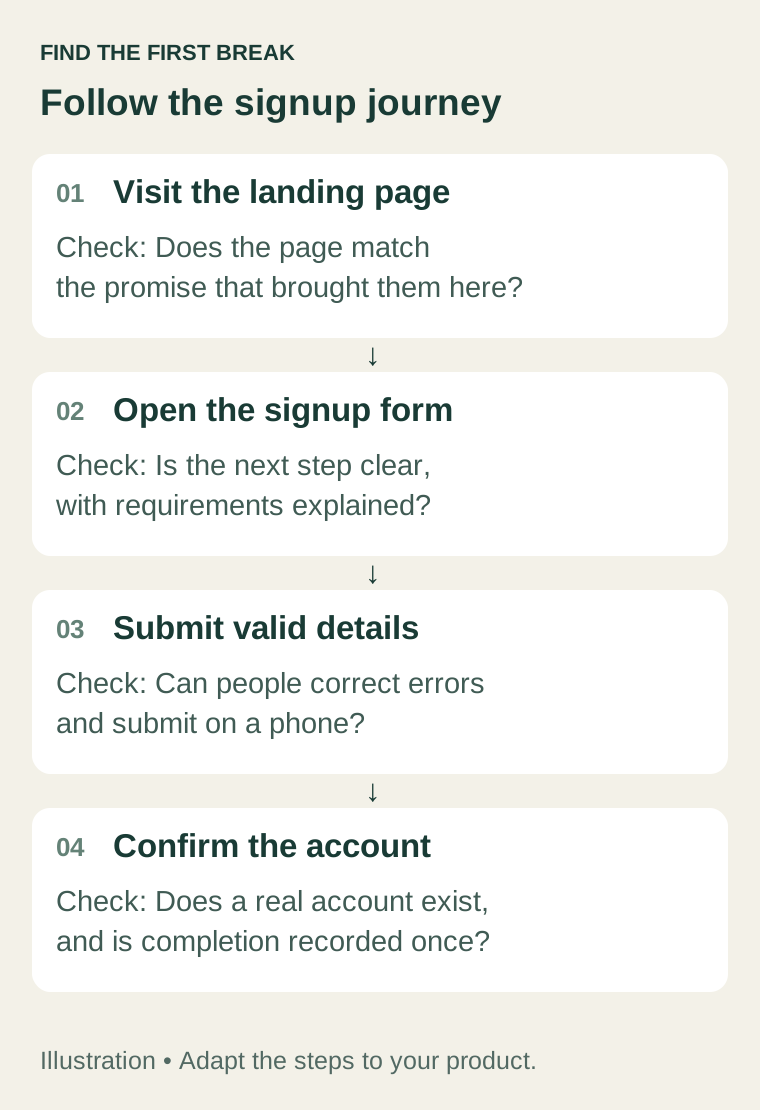
For a trial signup, the path might be:
- A person arrives on the intended landing page.
- They open the signup form.
- They submit a valid registration.
- Their account is created successfully.
Your product might add email verification or a booking confirmation. Use the steps that actually exist. If you cannot measure a step reliably, mark it as unknown rather than treating it as zero.
When using a funnel tool, check its counting rules. Google Analytics' funnel exploration documentation explains how defined steps and their order affect who is counted. A total of page views and a total of registered users are not automatically comparable stages of one funnel.
Use a consistent period and counting unit. Avoid dividing this week's registrations by this month's visits and calling the result a conversion rate.
Check whether the visitor and the page belong together
Group the evidence by the visitor's starting point: the campaign, referring site, search query where available, or landing page. Then compare the promise before the click with the first useful explanation after it.
Imagine a fictional scheduling product for independent consultants. An article called “How to plan your week” might attract readers looking for a personal calendar template. The product's paid offer might instead help consultants accept client bookings. Those readers are not necessarily looking for the same thing.
Inspect the actual connection:
- What problem did the link, post, or search result promise to solve?
- Does the destination answer that problem immediately?
- Is the next action appropriate for someone at this stage?
- Have you combined high-intent product visits with unrelated informational traffic?
An informational visitor may need a useful guide or a product example before a trial makes sense. That does not mean every page needs an email gate. Give the reader a next step that follows naturally from the reason they arrived.
If people arrive but do not start, inspect the offer
Open the landing page on a phone and answer four questions from the visible content:
- Who is this for?
- What can I accomplish with it?
- What will happen when I click the main button?
- What does trying it require?
“Start free” is unclear if the next screen requests a payment method or only accepts applications for a private beta. Use the action the product actually offers: “Create a free account,” “Book a demo,” or “Apply for beta.” Explain meaningful prerequisites near the decision.
Show one concrete example of the product doing the promised job. State relevant limits and provide a working way to contact the company. Use customer evidence only when it is real and you have permission to publish it.
If possible, ask someone who fits the intended audience to attempt the task while explaining what they expect. Observe where they hesitate. A handful of observations can reveal a broken button or confusing requirement; they do not establish how common that problem is across your entire audience.
If people start but do not finish, test the form
Try the complete flow on a phone and a laptop. Test keyboard navigation, a mistyped email address, an existing account, an expired verification link, and a failed connection where relevant.
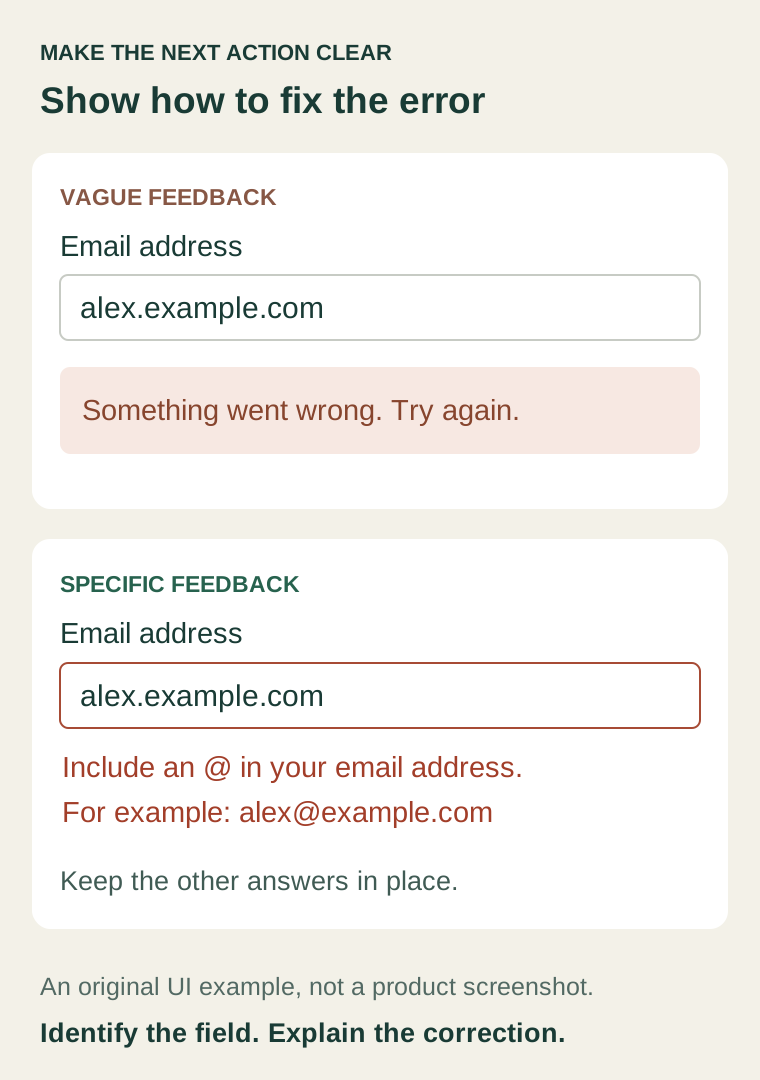
Check what a person sees when something goes wrong. Does the message identify the field and explain how to fix it? Does correcting an error erase other answers? Can the person tell whether the submission succeeded?
The web.dev form design guidance recommends clear structure and labels, with field-specific errors near the relevant control. Its form testing guide also provides a useful basis for checking the experience across devices and browsers.
For each required field, ask why the information is needed before the user can receive value. Keep requirements that support the actual service, consent, or necessary account setup. Move optional research questions later when that is appropriate.
Fix reproducible failures immediately. You do not need a large experiment to establish that a registration button cannot be pressed on a phone.
Use small numbers to choose questions, not declare winners
Consider a fictional seven-day review with 120 eligible visitors, 18 signup starts, and 3 completed accounts. Assume those figures describe the same cohort, that the steps are measured correctly, and that duplicate attempts have been handled consistently.
You could investigate both the 102 visitors who did not start and the 15 starters who did not finish. The counts alone do not tell you why either group stopped. Perhaps the incoming audience was a poor fit. Perhaps the form failed. Perhaps some people intended to return later.
Three completions are also a fragile basis for comparing tiny device or channel segments. One additional account can noticeably change the reported rate.
Start with evidence you can verify: a mismatched promise, an unclear requirement, an error you can reproduce, or a question repeatedly raised by intended users. Treat a later increase as an observation to investigate, especially if the traffic source or offer changed at the same time.
Make one change you can explain
Keep a short decision record:
- Observation: what happened, with the relevant page, period, and audience.
- Possible explanation: what might account for it, and what is still unknown.
- Change: the specific improvement you will make.
- Check: how you will confirm that the change works.
- Review date: when you will return to the outcome data.
For example: “On a phone, an invalid email produces an error below the visible form. Move the message next to the email field, keep the other answers, and repeat the invalid-email test.”
That change has a direct verification step. Whether it increases completed registrations is a separate question that requires subsequent evidence.
Where FounderOmni helps
Use Omni Web Analytics to inspect website traffic, acquisition, pages, and configured conversion goals. Verify the goal setup before relying on its totals. Use Omni Links to preserve campaign context in the links you share.
If a search visitor arrives with the wrong expectation, review the available query and landing-page evidence in Omni SEO & GEO. For a hosted inquiry form, Omni Forms can help collect responses. These tools support the investigation; they do not establish the reason a person left or guarantee that a change will improve signups.
For the wider measurement plan, read how to measure one campaign end to end. If discovery itself is still the problem, start with what to fix first after your website goes live.
Choose the earliest step you can verify is broken or unclear. Repair it, repeat the journey, and record what changed. Buying another hundred clicks becomes a more useful decision once you understand what happens to the people already arriving.
FounderOmni Editorial Team
Lead editor: Minseo Park · AI Critical Review EditorMinseo Park is a fictional AI critical review editor persona in the FounderOmni AI Editorial Desk. He challenges assumptions, counterexamples, and measurement logic. This article was prepared with AI assistance.