
One Useful Tool: Validate the Job Before You Build More Features
Test one concrete user job before expanding a tool. Separate demand, successful use, and willingness to pay with a practical evidence record.
 FounderOmni Editorial TeamPublished October 2, 2026Lead editor: Rowan Hale · AI Research Editor
Before adding accounts, dashboards, integrations, or another AI feature, prove that someone can get one useful result from your tool. A focused test gives you a clearer next decision than a longer feature list.
The question is specific: does this audience have this job, can your tool complete it, and is the result useful enough to justify the next investment? Interest in an idea, successful use, and willingness to pay are different signals. Keep them separate.
This article takes inspiration from GeFei's public explanation of building small products around explicit problems. The workflow below is our own editorial approach to testing one job. It does not reproduce his paid material or treat his reported business results as evidence for your product.
Write the job as an input and an output
“An AI platform for creators” leaves almost every product decision open. A narrower starting point is “help a newsletter editor prepare a campaign link without guessing how to name its parameters.”
Write a task statement with four parts:
- Person: who is trying to do the work?
- Trigger: what happened that makes the task necessary now?
- Input: what can they provide?
- Useful output: what should they be able to use afterward?
For an illustrative image tool, the statement might be: “A founder preparing a product page has an image that exceeds their publishing limit. They need a smaller file whose text and product details remain legible.”
That statement gives you something to test. “People like our compression interface” is less useful than observing whether they can produce and inspect a file that fits their actual destination. Do not invent a universal file-size target: ask what the destination requires.
List what the first version excludes. Batch processing, saved presets, shared libraries, and approval workflows may all be useful later. Their value depends on whether the initial task works and what users actually need next.
Inspect the alternative people can use today
A problem can be real while your proposed product adds little. The existing workaround may already be good enough.
Squoosh provides a concrete example of a focused image-compression workflow: open an image, inspect differences, adjust settings, and save the result. Its official repository identifies it as an image-compression web app supporting multiple formats. We rechecked the public page and repository on October 1, 2026; this is a review of their descriptions, not a compression benchmark or a claim about commercial results.
The opening page offers “Drop OR Paste” and sample inputs labeled Large photo, Artwork, Device screen, and SVG icon. That gives a founder two specific interface choices to examine: make the expected input obvious, and offer a sample when finding an appropriate file is an obstacle. We inspected those public labels, not the completed interactive compression flow. In your own test, record whether a sample helps a person understand the output or merely postpones difficulty with their real file.
The useful lesson is the visible outcome. Compression is not finished because a progress indicator reaches the end; the user needs an acceptable file. For your own tool, identify the equivalent output and the point at which a person can judge it.
Compare your proposal with a direct tool, a spreadsheet or manual process, and doing nothing. Record the extra effort, missing context, or repeated mistakes your idea would address. Treat those as hypotheses until someone with the real task confirms them.
If the existing alternative solves the job comfortably, you may need a narrower audience or a different problem. A new interface alone does not establish a reason to switch.
Separate demand evidence from product evidence
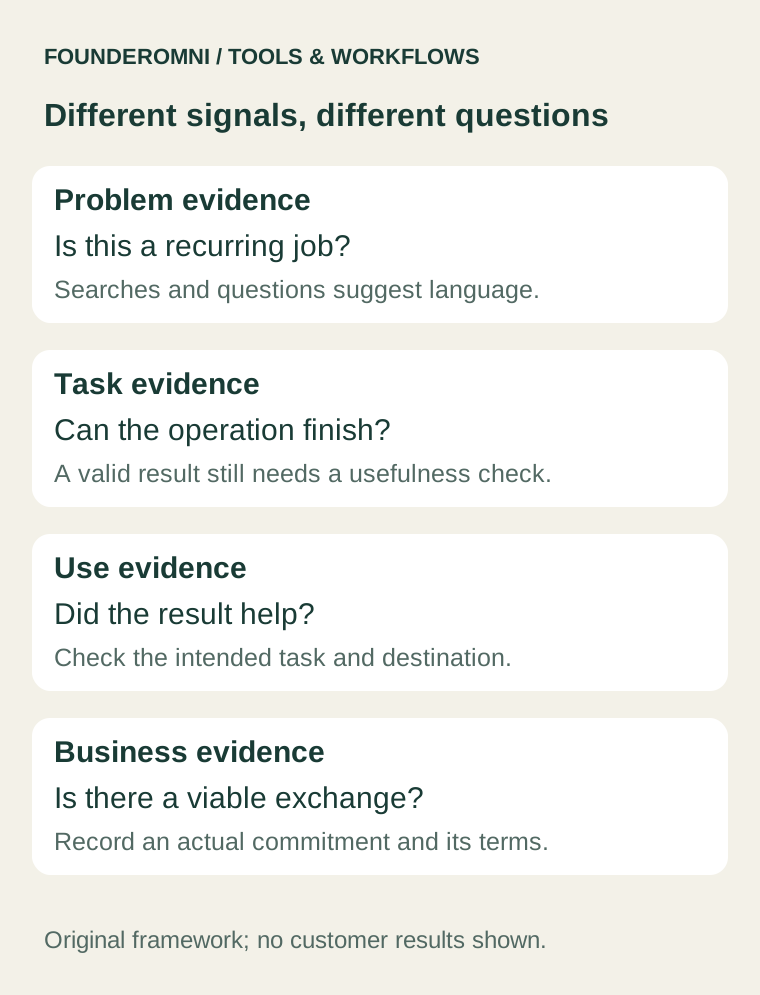
Start an evidence record before coding more. Keep each observation attached to the conclusion it can support.
- Searches and public questions can reveal language and recurring concerns. They do not prove that someone wants your particular implementation.
- A visit or ad click shows a response to an entry point. It does not prove that the visitor completed the task or would pay.
- A valid output shows that the tool performed a defined operation in that attempt. It does not show that the result was useful outside the tool.
- Using the output in the intended workflow is stronger evidence of task fit. One successful use still leaves frequency and business viability open.
- A real purchase or commitment addresses a commercial question. Record what was actually offered and agreed, rather than treating a positive comment as a sale.
These signals answer different questions; they are not a guaranteed sequence or a universal scoring model. A small qualitative test can uncover a clear usability failure while remaining far too small to estimate market demand.
For discovery research, keep the query, language, market, date, and source beside each observation. Our page-choice guide explains how to inspect relevant pages without assuming that every keyword needs another article.
Build the smallest honest test
Choose the version that can answer the current question. If you do not yet understand the task, an observed manual walkthrough may be more informative than a new integration. If you understand it but doubt the output quality, build the operation needed to test that output.
Tell participants what works, what is manual, and what is still a prototype. If the page only collects interest, describe it as an interest form; do not present a nonfunctional button as a working tool. A prototype that has clear limits can still produce useful evidence.
Give the person a task they genuinely need to complete. Let them attempt it before explaining every control. Record where they hesitate, what they expect, and whether they can tell that the result is ready. With their permission, retain only the observations needed for the test, not unnecessary copies of their files or private work.
For the image example, a repeatable check is:
- State the intended publishing destination and its file requirements.
- Provide an appropriate input file.
- Produce a candidate output.
- Inspect important details at the size in which the image will be used.
- Confirm whether the output meets the destination's requirements.
- Record the reason for accepting or rejecting it.
This is a proposed test script. It is not a report of an experiment we conducted with customers.
Measure the useful result, not every click
Define the few states that distinguish an attempt from a result. For an illustrative utility, that could be task started, valid input accepted, output generated, and output saved. Add a failure reason where the tool can report one reliably.
Saving a file does not prove that it was used successfully. A brief follow-up about the intended task may answer a question that another event cannot. Likewise, do not call repeat visits “retention” without considering how often this job naturally occurs. An occasional utility can be useful without being used every day.
Write down what your measurement misses: consent choices, unsupported devices, blocked scripts, work completed elsewhere, or outcomes you cannot observe. Keep raw inputs and sensitive contents out of event names and analytics properties.
If your FounderOmni setup already captures the relevant event or goal, Omni Web Analytics can help you inspect that recorded behavior. Check the configured measurement first. A dashboard cannot supply an outcome that your implementation never recorded.
When people arrive but do not complete the next action, use the signup-diagnosis guide to distinguish a measurement gap from an audience, offer, or usability problem. A tool output may be your next action; forcing a signup is not always necessary for the test.
Make one decision before adding a feature
Review the evidence against the question you wrote at the start.
- The right people attempt the job but cannot get a valid result: investigate the operation, instructions, defaults, and errors before expanding the feature list.
- The tool works, but you have not reached people with the task: test a more relevant entry point or recruit appropriate participants. Low traffic alone does not identify a product defect.
- People use the result and encounter a repeated next obstacle: test whether one additional capability removes that obstacle.
- People have the task but prefer an adequate alternative: investigate the switching barrier or reconsider the problem. More features may not change the choice.
- Evidence is mixed or too thin: narrow the question and run another bounded test, or stop if further learning is not worth the cost.
Use a feature proposal to state the obstacle it addresses. “Add batch processing because the same user must prepare several files in one session” is testable. “Competitors have batch processing” is a reason to investigate, not sufficient evidence to build it.
Keep a short test record
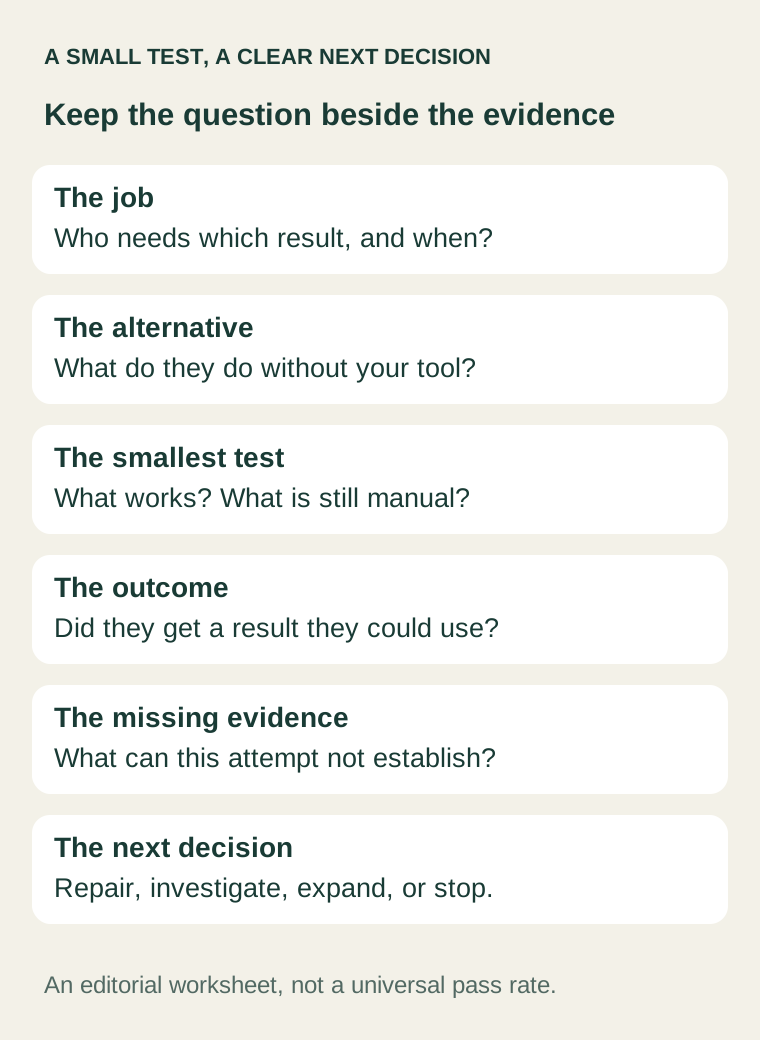
Copy these fields into the place where your team makes product decisions:
- Job and audience: who needs which result, in what situation?
- Current alternative: how do they solve it today, including doing nothing?
- Uncertain claim: what specific assumption are we testing?
- Smallest test: what will work, and which limitations will we disclose?
- Useful outcome: what would count as completing the task?
- Evidence collected: what happened, in which context, and what remains unknown?
- Time and cost boundary: when will we review or stop this test?
- Next decision: repair, change the entry point, test one addition, investigate further, or stop?
Keep the original question visible when requests for new features arrive. Add work when it helps answer that question or when the evidence supports a new one.
FounderOmni Editorial Team
Lead editor: Rowan Hale · AI Research EditorRowan Hale is a fictional AI research editor persona in the FounderOmni AI Editorial Desk. His role focuses on sources, claims, and evidence trails. This article was prepared with AI assistance.