
Before You Write: Read the Search Results to Choose the Right Page
Choose a useful page format before drafting. Inspect the reader’s task, compare real examples, and turn your observations into a practical page brief.
 FounderOmni Editorial TeamPublished September 28, 2026Lead editor: Rowan Hale · AI Research Editor
Before you commission a blog post, decide what a visitor needs to accomplish. A useful answer might be a guide. It might also be a calculator, a comparison, or a product page that lets someone start working.
Reading the search results helps you test that choice. It does not tell you how many customers you will win, and it is not a reason to reproduce the pages already there. The aim is to choose a page you can make useful before spending time writing it.
Start with a task, not a headline
Write down one candidate query and complete this sentence: “After searching for this, a person wants to ___.” Use a verb: create, understand, compare, troubleshoot, download, or buy.
Take three possible searches around campaign links:
- “UTM builder” suggests a person may want to create a tagged URL now.
- “What are UTM parameters?” suggests they need an explanation before using them.
- “UTM naming convention” suggests they may need a repeatable rule or template for their team.
These are starting hypotheses, not a measured distribution of search intent. Open the results to see whether the pages support your interpretation. A familiar keyword can contain several different jobs.
A weak brief starts with “write 1,500 words about UTM.” A more useful brief says “help a marketer produce one correctly tagged link, with a worked example and a way to check the output.” The second tells you what the page must deliver.
Inspect a small, consistent sample
Search in the language and market you intend to serve. Record the date, engine, country or region setting, device, and exact query. Note whether you are signed in. These details make the observation easier to revisit; they do not make one search universal.
Open five relevant organic results as an initial sample. Five is a manageable working limit, not a statistical threshold. Keep ads separate, and note other visible features such as a map, video block, or answer panel. If the results disagree about the task, expand the sample or narrow the query instead of forcing a conclusion.
For each page, record:
- The format: tool, product, comparison, guide, template, directory, or another type.
- The first useful action: what someone can accomplish without hunting through the page.
- The evidence: examples, working controls, specifications, source material, or an actual demonstration.
- The friction: account requirements, missing instructions, unclear limits, or unusable mobile controls.
- The unanswered question: something relevant that you could explain or solve better.
Read the page, not just its search title. A result called a “guide” may lead with a working tool; a page called a “tool” may mostly be a sales pitch. Record what it does.
A real example: one topic, two different outputs
Google provides both a Campaign URL Builder and instructions for collecting campaign data with custom URLs.
The builder is a destination for creating a campaign URL. The help page explains campaign parameters and how they relate to reporting. They address related work, but a reader who wants a generated link has a different immediate need from someone trying to understand the parameters.
In a browser check on September 26, 2026, entering https://example.com/, source newsletter, medium email, and campaign launch produced a link containing utm_source=newsletter, utm_medium=email, and utm_campaign=launch. This confirms the illustrated input-to-output task in that check; it does not test attribution in an Analytics property.
These are public page-format examples checked on September 26, 2026. They are not a claim about either page's search position, traffic, or conversion rate. The distinction comes from the pages themselves, not a ranking assumption.
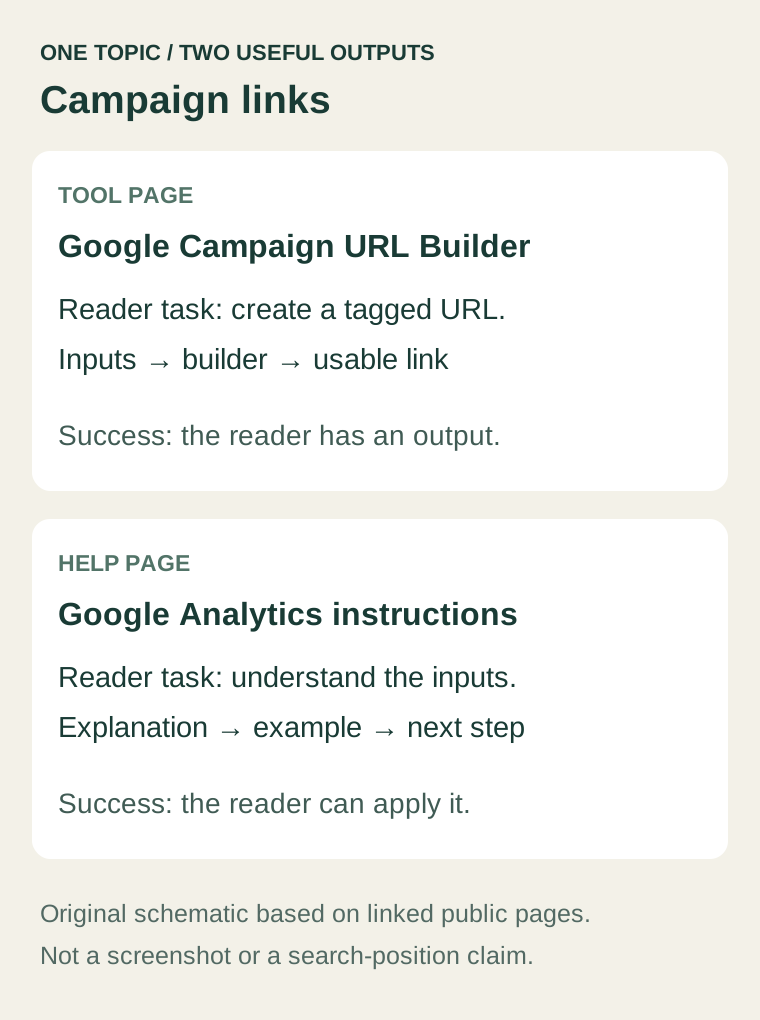
For a small team, this distinction changes the work order. If the intended job is creating a URL, a long introduction will not substitute for a working builder. If the intended job is understanding attribution, an unexplained set of input fields may be equally frustrating.
You can connect both experiences with helpful links. You do not have to build both before proving that you can serve either audience well.
Match the output to the job
Use the evidence you collected to choose an initial format:
- Create or calculate: put the working tool and its output near the start; explain assumptions and limitations beside it.
- Understand or troubleshoot: give a direct answer, a worked example, and steps the reader can repeat.
- Compare: explain the decision criteria and relevant differences, with current sources and clear limits on what you tested.
- Adopt a process: provide a usable template or checklist, including an example of how to fill it in.
- Evaluate a product: show the actual capability, requirements, relevant limits, and next action.
This is a planning framework, not a rule that every query has only one correct page type. Mixed results can reflect multiple needs. Choose the need that fits your audience and that you can serve credibly.
Avoid creating a different URL for every slight wording change. Ask whether the new page would deliver a distinct result for the reader. If the answer is the same, improving an existing page may be the more coherent choice.
Find a contribution beyond the existing results
“Longer than the first result” is not a useful contribution by itself. Look for a practical improvement that you can demonstrate: a missing edge case, a clearer example, a downloadable worksheet, or instructions that work on a phone.
For the campaign-link example, your contribution could be a naming worksheet for a two-person team and a check that the final link retains its parameters after a redirect. That is a proposed addition, not a claim that competing pages lack it. Inspect the actual alternatives before making that claim.
Google's people-first content guidance asks whether content adds original information or substantial value. Use that as an editorial question: what does a reader gain here that justified making this page?
Do not invent product testing, customer quotes, or results to make the answer sound authoritative. A small, reproducible example is more useful than an unsupported success story.
Write a one-page brief before drafting
Use the following worksheet for one candidate page:
- Reader and task: who needs to do what?
- Candidate query: exact wording, language, and intended market.
- Observation: date, search settings, sample URLs, and formats found.
- Chosen output: what the reader will have or understand after using the page.
- Original contribution: the example, tool, comparison, or resource we can substantiate.
- Existing page check: should this improve a current URL or become a distinct page?
- Next action: what follows naturally, without interrupting the reader's task?
- Success check: the useful action to measure and the limitations of that measurement.
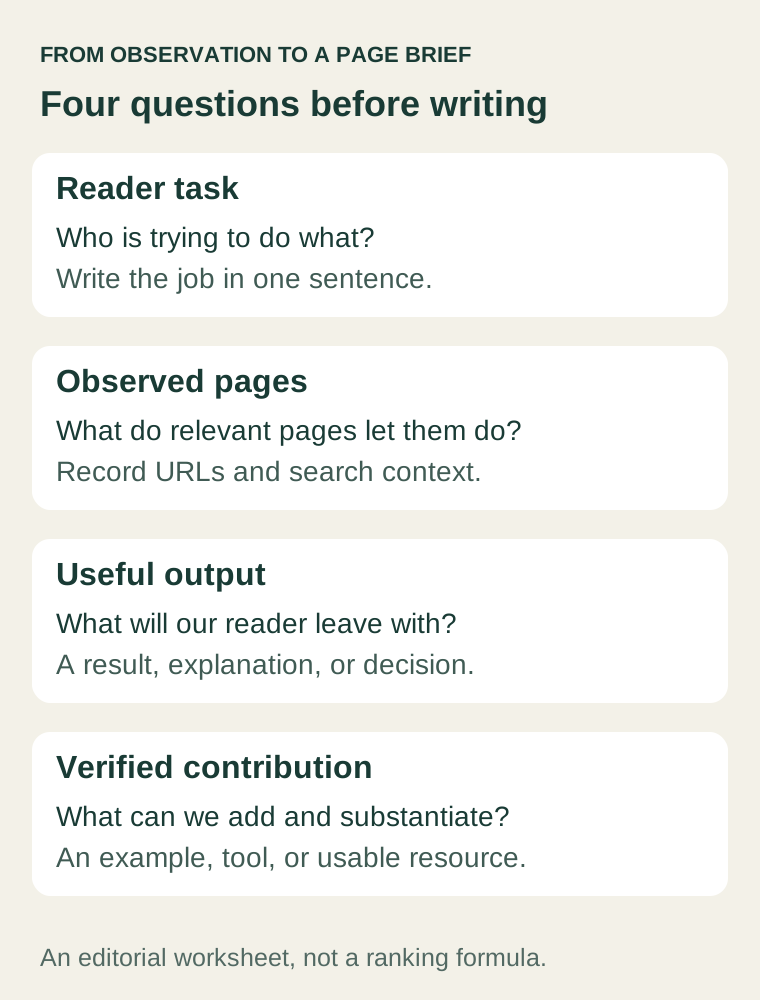
If you cannot fill in the output and contribution fields, the brief is not ready. More keywords will not resolve that gap.
Recheck the choice after publication
After the page has had an opportunity to appear in search, inspect the queries and landing pages available in Omni SEO & GEO or your connected search provider. Check whether the page is attracting the kind of question it was designed to answer. A new page may not have enough data for an early conclusion.
Then examine the next useful action. For a tool, that might be producing a valid output. For a guide, it might be using its worksheet or continuing to a relevant example. Choose measures your setup actually captures rather than assuming that time on page proves usefulness.
If visitors arrive but do not take the intended next step, use our signup-diagnosis guide to separate measurement problems from audience, offer, and usability problems. For a new website that still needs its foundations checked, start with the first-week SEO and AI search plan.
Before assigning the first draft, complete the output and contribution fields in the brief. They give the writer something concrete to build and the reviewer something concrete to check.
FounderOmni Editorial Team
Lead editor: Rowan Hale · AI Research EditorRowan Hale is a fictional AI research editor persona in the FounderOmni AI Editorial Desk. His role focuses on sources, claims, and evidence trails. This article was prepared with AI assistance.