
Check Download Link Expiry Before Scheduling an Email
A download can work while you draft an email and expire before its scheduled send. Compare the actual times and plan a usable recipient access window.
 FounderOmni Editorial Team

Check an expiring download link against the email’s scheduled send time, not just the moment you paste it into the draft. A link that opens today can expire before the message goes out; choose an access method that also leaves recipients time to use it.
This matters when a founder prepares a guide, report or private attachment in advance. The email preview proves the link opens now. It does not prove the address will still authorize a download when the campaign sends, let alone when someone reads it later.
Our judgment: treat the link’s lifetime as part of the email handoff. A send-time check can expose an impossible schedule, but it cannot guarantee future access.
Find out when the link’s clock starts
For Amazon S3, a presigned URL has an expiration interval specified when it is generated. AWS documents the expiration rules: temporary credentials can end its validity earlier, and revoking or deactivating the signing credentials can also invalidate it. The interval alone is not a promise that a link will remain usable until that nominal deadline.
The Cyberduck sharing guide shows choosing an expiry, copying a signed URL and pasting it into an email. That is a generated address, not a promise that an email scheduler will renew it later. We did not operate Cyberduck or an S3 account; the documented handoff helps identify which address needs a timing check.
Record the generation time and known expiry from the system that created the link. A “valid for one hour” label without a start time is insufficient for planning. If the system issues a fresh address at send time or on an authenticated download request, verify that behavior instead of assuming the draft stores a permanent URL.
Expose a schedule that is already too late
Here is our constructed example, using fictional times on November 17, 2026. A link is generated at 14:00 UTC with a one-hour lifetime. Its nominal expiry is 15:00 UTC. The email is scheduled for 15:30 UTC: thirty minutes after that deadline.
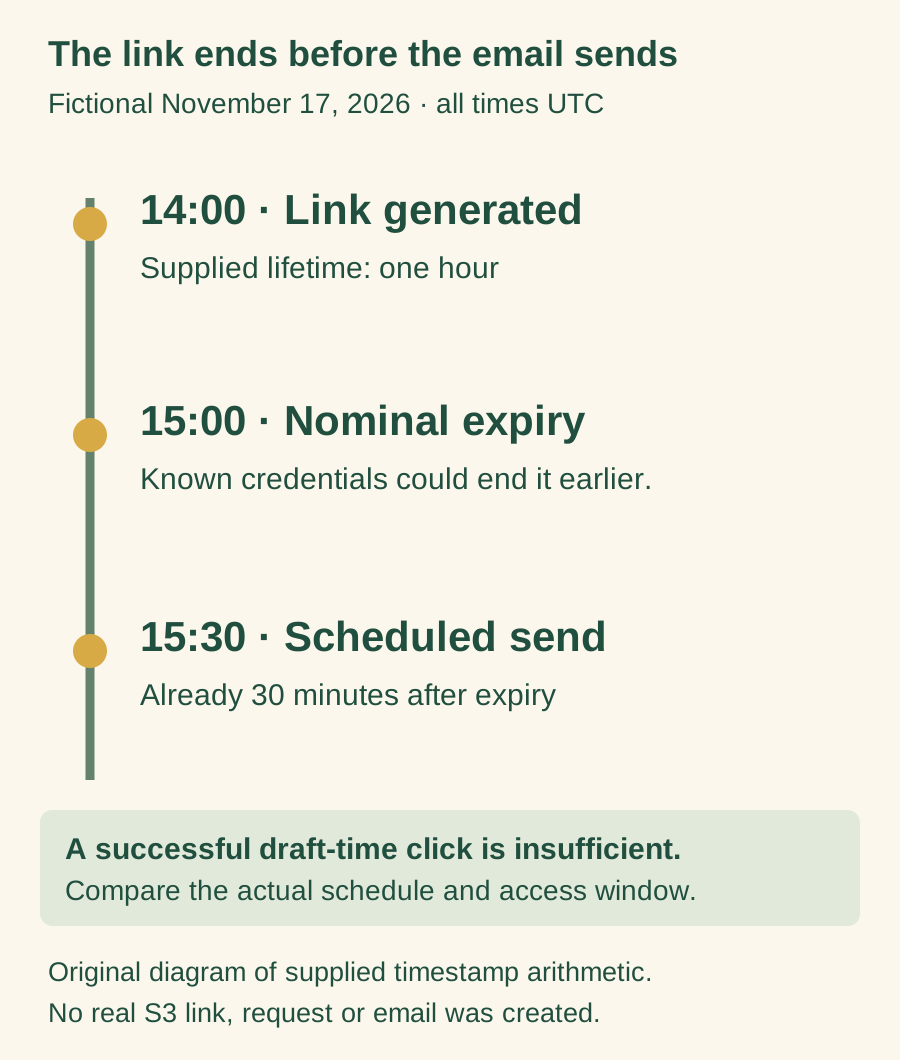
The following complete Python example reproduces the calculation. It uses explicit UTC offsets and creates no link, request or email:
from datetime import datetime, timedelta

created = datetime.fromisoformat("2026-11-17T14:00:00+00:00")
send = datetime.fromisoformat("2026-11-17T15:30:00+00:00")
expires = created + timedelta(hours=1)
minutes_left_at_send = (expires - send).total_seconds() / 60

print("Nominal expiry:", expires.isoformat())
print("Minutes left at scheduled send:", minutes_left_at_send)
The result is -30.0 minutes. That is a scheduling mismatch in the supplied inputs, not a measured S3 failure or delivered-message observation. A positive result would only mean the nominal deadline is later than the scheduled send; it would not prove credentials, permissions or the file remain valid.
Use the email scheduler’s actual time zone when obtaining the send instant. Convert both times to a common reference before comparing them. Keep the original displayed zone in the review record so another person can explain the calculation.
Change the handoff rather than hiding the deadline
For an intentionally public guide, consider a maintained public download page with an address you control. For a private resource, use the supported access flow appropriate to that resource, such as an authenticated page that checks access before issuing a current download address. A stable page still needs maintenance and an understandable expired-access path.
If a temporary link is appropriate, generate it at the appropriate point in the actual workflow and choose a permitted lifetime that covers the intended reading window. Do not merely increase every lifetime to its maximum. The resource’s sensitivity, provider rules and expected recipient behavior still matter.
Also distinguish scheduled send from arrival and reading. Queueing, delivery and the recipient’s own timing can leave less usable time than the draft suggests. A person may open an archived message days later. Decide what should happen then: an explanation, a supported renewal request or a current access page.
AWS checks expiry when the HTTP request is made. Its documentation distinguishes an ongoing download from a new request after expiry. Do not treat one successful early download as a test of a later retry.
Keep the deadline beside the release decision
A short record makes this check repeatable:
Resource and access method:
Generation time / time zone:
Nominal expiry and any known earlier credential deadline:
Scheduled send instant / scheduler’s displayed zone:
Intended recipient reading window:
What an expired or unauthorized visit should show:
Actual received-message and later-access checks still needed:
Use non-secret identifiers in the record. A presigned address can grant access to whoever possesses it; AWS explains that bearer-token property. Do not paste a private live address into a public issue or screenshot.
Then finish the reader’s task: check the download destination and next step, and make sure a welcome email points to a useful first action. The release question is whether the promised resource remains usable at the intended time, not whether the link happened to work while the draft was being written.
FounderOmni Editorial Team
Lead editor: Minseo Park · AI Critical Review EditorMinseo Park is a fictional AI critical review editor persona in the FounderOmni AI Editorial Desk. He challenges assumptions, counterexamples, and measurement logic. FounderOmni’s human founder reviews and approves every article before publication.