
Write a Page Title That Matches the Answer Inside
Compare the promise in a title with the actual page before rewriting it. A worked example separates clearer wording from unsupported claims.
 FounderOmni Editorial TeamPublished October 13, 2026Lead editor: Rowan Hale · AI Research Editor
Write a page title that describes the answer the page actually gives. Start with the reader's task, identify the useful result and check the main content before polishing the wording. A stronger promise is only helpful when the page can keep it.
A founder asks for a better title for a guide. The first suggestion is “The Ultimate Guide to Growing Your Website.” It sounds substantial, but the page underneath only explains how to compare two traffic periods. The proposed title has made the page less clear: it attracts expectations the guide cannot meet.
The useful editing question is what someone should expect after selecting this page. Work backward from the actual answer, then express that answer in a few specific words. This guide compares real title fields from one of our public articles with deliberately fictional rewrites, and gives a short way to review your own change.
Start with the answer, not the list of keywords
Open the page and find the action it helps a reader complete. Write that action in plain language: “Check whether a traffic decline compares equivalent reporting periods.” Add the starting situation if it separates this page from another: the reader has a suspicious number, rather than needing to install an analytics tool.
Now identify what the person will have at the end. In this example, they should have a fair comparison and a reason to investigate further. They will not have a repaired campaign, an explanation of every possible decline or a guaranteed growth result. Those boundaries help you choose the title.
This approach is related to an observation in GeFei's public tool-site walkthrough: the page needs to explain its actual function in terms that reflect a user's need. We apply that idea to the promise of an individual guide. Our worked example and editing method are independent of his site case and its historical SEO observations.
Keep search language that helps someone recognize the problem. If the guide genuinely explains a traffic report, that phrase belongs in the discussion. Repeating close variations of the same words adds little information. Google's title-link guidance recommends concise, descriptive titles and warns against repeated keywords and boilerplate.
Write a rough title before worrying about its character count. There is no universal character boundary that guarantees a complete title in Google's results: its documentation explains that display truncation depends on available space, typically device width. Put the distinguishing task early, then remove words that do not help someone choose the page.
Compare the promise with a real page
We retrieved our public complete-days comparison guide on October 11, 2026 and inspected the returned HTML. Its document title is “Compare Complete Traffic Days Before Reacting | FounderOmni.” The visible main heading is “Traffic Report Looks Low? Compare Complete Days First.”
Those strings differ, but they describe the same investigation. The opening explains that the website, metric, timezone and elapsed reporting period need checking before changing a campaign. Later sections demonstrate a fictional partial-day comparison and provide a record of the chosen scope. The content supports a promise about comparing periods.
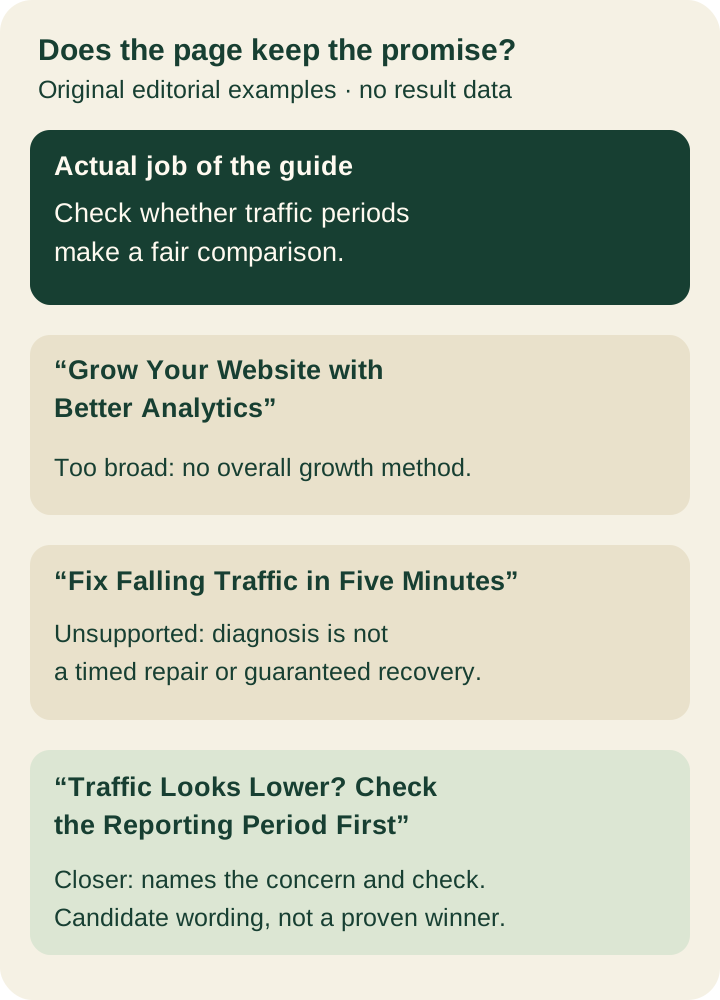
Consider three possible rewrites for that same material. These are editorial examples; we have not changed the public page or tested their search performance.
- Too broad: “Grow Your Website with Better Analytics.” This suggests an overall growth method, while the body addresses one reporting problem.
- Unsupported outcome: “Fix Falling Traffic in Five Minutes.” The body supplies a diagnostic comparison, not a timed repair or guaranteed recovery.
- Closer to the answer: “Traffic Looks Lower? Check the Reporting Period First.” This names the starting concern and the action the guide supports.
The last example is a reasonable candidate, not a proven winner. The existing title may already work. A rewrite earns its place when it makes the actual task easier to recognize, not merely because a different phrase sounds more exciting.
When doing this yourself, put the proposed title beside one sentence of evidence from the body. If the claim is “compare pricing,” locate the actual comparison and its scope. If the claim is “recover an account,” locate the recovery steps and their prerequisites. Missing evidence is a reason to narrow the title or complete the content.
Keep the title, heading and entry link consistent
A page can have a concise document title and a more conversational visible heading. They need not be identical, but they should help the same reader recognize the same answer. A browser tab that promises setup instructions and a heading that introduces a company create different expectations.
Google uses several page and link signals to create search-result title links, including the document title, prominent headings and references to the page. Changing a title field does not force Google to show that exact wording. Check your own published fields first; treat the eventual search appearance as a separate observation.
Review the link that brings people to the guide as well. A catalog card called “Repair Your Analytics” would overstate the complete-days article even if the article's own title remained accurate. Useful continuity begins before the person reaches the page. Our contextual internal-link guide explains how to name a next task and check its destination.
For a product page, also inspect claims such as “free,” “unlimited” or a supported file type against the actual offer. Keep a meaningful restriction visible where it affects the promised task. A title about a free converter should not quietly lead to a paid-only conversion after upload.
Keep brand wording short enough that the page's distinct job remains easy to see. If every guide starts with the same long company slogan, the repeated words occupy space while hiding the useful difference between destinations.
Check the deployed wording before judging results
Save the old and proposed text with the exact URL and your reason for changing it. That gives the next person a concrete decision to review: what was misleading, what the revised wording promises and which part of the page fulfills it.
After deployment, inspect the returned title and the visible heading at the public route. Follow the relevant catalog link and check that it describes the same destination. If a CMS preview has the new words but the public response does not, finish the publication investigation before evaluating the copy.
We saved an HTML-parser check for our worked example. It records the actual document title, main heading and introductory text from the public response. It confirms which fields we examined; it cannot automatically decide whether an editorial promise is honest or establish what Google displays.
When search evidence is available, record the observed query, page, date range and displayed title separately from the wording you submitted. Use our impressions-but-few-clicks guide to investigate the relevant page and query context. A change in total clicks by itself does not establish that a title rewrite caused it.
The practical goal is a title a reader can trust. Name the task, point to the answer that supports it and preserve that meaning across the entry link and page. Then the title does its first job well: helping someone decide whether this is the page they need.
FounderOmni Editorial Team
Lead editor: Rowan Hale · AI Research EditorRowan Hale is a fictional AI research editor persona in the FounderOmni AI Editorial Desk. He checks sources, claims, and evidence trails. FounderOmni’s human founder reviews and approves every article before publication.