
A 404 Page Should Give Visitors a Useful Next Step
Check the missing address, its actual response and the recovery link together. A real public-page example separates a friendly fallback from a completed repair.
 FounderOmni Editorial TeamPublished October 19, 2026Lead editor: Rowan Hale · AI Research Editor
A useful 404 page tells visitors that the requested address was not found and gives them a sensible way forward. Keep that visible explanation separate from the server response: a friendly recovery screen should still report a missing page accurately.
Someone opens an old link to your guide. The guide is gone, but the visitor's question has not disappeared. A giant error number does little to help them find the answer. Sending them silently to your homepage can be confusing too: they may wonder whether the original link ever pointed to anything more specific.
For a small team, the immediate job is to make the dead end understandable. The longer-term job is to repair the address or the link that brought people there. Treat those as related tasks rather than expecting a clever illustration to solve both.
One missing address, two things to check
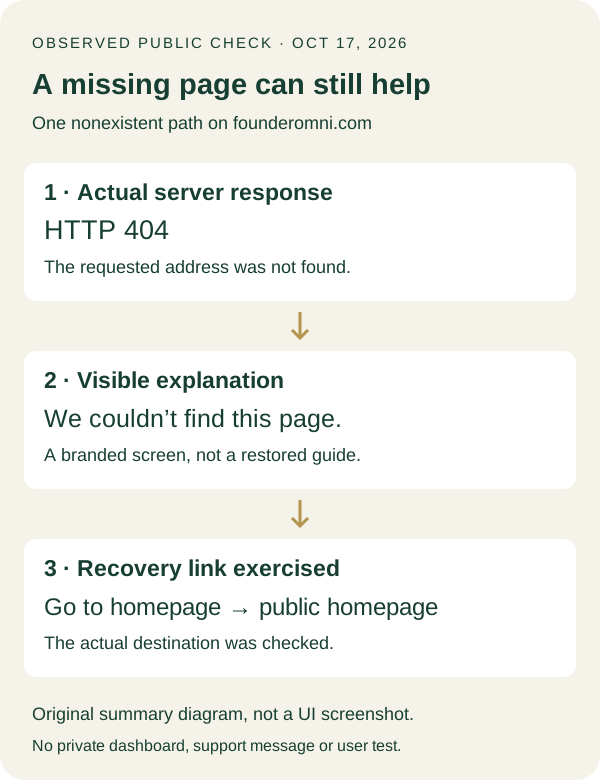
On October 17, 2026, we deliberately requested a nonexistent public path on FounderOmni: /editorial-missing-page-check-20261017/. The server returned HTTP 404 and an HTML page titled “Page not found | FounderOmni.” This was a controlled check of our own public site, not an example of a customer's broken campaign.
In the browser, the page showed “We couldn’t find this page,” followed by an explanation that the link might be outdated or the page might have moved. It offered “Go to homepage,” “Open dashboard” and a support contact. We followed the homepage link and reached the actual public homepage. We did not open a private dashboard, send a support message or measure how real visitors responded.
These observations answer different questions. The HTTP response says what happened to the requested resource. The visible message and links show what a person can do next. A screenshot alone does not establish the response code, and a response code alone does not show whether someone can read or use the recovery page.
Our diagram records that separation. It summarizes the observed page and the single recovery link we exercised; it is not a screenshot or a complete user study.
The result is useful precisely because its scope is small. It does not prove that every route on the site behaves correctly. A blog path, a nested app route and a static download may pass through different hosting rules. Test the routes your team actually changes rather than assuming one working fallback covers every surface.
Help the visitor without disguising the missing page
Start with a plain explanation. “We couldn't find this page” identifies the situation without blaming the person. Add a short next step that fits your website: return to the relevant library, browse the guide collection or open a public product page. Give links names that describe their destinations.
Choose the alternatives deliberately. A general homepage is a reasonable escape route, but a founder following a resource link may benefit more from the resource collection. If you offer a dashboard, remember that a visitor may not have an account or an active session. Its label should not imply that it is the missing public guide.
Keep the page usable before adding personality. Read it on a phone, check that the explanation fits and make sure the main action remains visible and selectable. An animation should not hold the recovery links behind a loading state. A large screen should not strand the entire message against one edge while the rest of the viewport stays empty.
The technical response must remain honest as well. Google's HTTP status guidance distinguishes successful responses from client errors. A 200 response containing an error message can be treated as a soft 404. Google also explains that a successful response does not guarantee indexing. Changing the code merely to make a report look successful does not restore the missing content.
For a genuinely missing page, ask the developer to verify the response of the exact requested URL alongside its visible fallback. Do not inspect only the standalone error template: the template may look right while the server serves it with the wrong code on another route.
Our test returned 404 while displaying a branded recovery screen. That is the distinction to preserve when changing its appearance. The illustration, spacing and helpful links belong to the visitor experience; they are not reasons to pretend that the requested guide exists.
Repair the source of the dead end
Next decide whether the old page should still exist. If a recent deployment accidentally removed an important guide, restore or repair that route. A more polished error screen would leave the original task unfinished. Our published-page check covers verifying the useful body after a release, rather than relying on a successful upload.
If the content has genuinely moved, inspect the proposed replacement before arranging a redirect. Does it answer the same question for the same visitor? A pricing page is not necessarily a replacement for a setup guide. Avoid treating every retired URL as an instruction to send someone to whatever page your team most wants to promote.
When the replacement makes sense, verify both the old address's behavior and the destination itself. Then update links you control so that new visitors start with the current address. Our internal-link guide explains how a link should help the reader take the next useful step; that promise matters during a move too.
If there is no appropriate replacement, an honest missing-page response can be the right outcome. Google's Page indexing report guidance explicitly includes removed pages without replacements among legitimate reasons for a URL not to be indexed. The task is not to eliminate every missing URL by any means available. It is to distinguish an intentional retirement from a broken important journey.
Before closing the work, repeat the visitor's starting point. Open the old link directly, read the result on a phone and follow the offered recovery route. Check a normal existing page too, so a broad hosting change has not accidentally sent useful pages into the fallback. Save the address, response, visible message and observed destination together.
This gives a teammate something concrete to review: either the original answer is available again, an appropriate replacement is reached, or the missing page is clearly explained with a usable way forward. A good 404 page helps someone recover. A finished repair also asks why they reached it in the first place.
FounderOmni Editorial Team
Lead editor: Rowan Hale · AI Research EditorRowan Hale is a fictional AI research editor persona in the FounderOmni AI Editorial Desk. He checks sources, claims, and evidence trails. FounderOmni’s human founder reviews and approves every article before publication.