
A CSV Export Should Keep IDs and Dates Intact
Compare the delivered CSV with its import settings before blaming the exporter. A labeled sample and review record separate file contents from spreadsheet interpretation.
 FounderOmni Editorial Team

Before sharing a CSV export, check that identifiers and dates keep the meaning they had in the source. Compare the delivered text file with the way the receiving application imports it. A changed spreadsheet display does not, by itself, tell you which step changed the data.
A founder sends a campaign report to a teammate. One campaign code begins with zeros, another identifier is a long string of digits and the report includes a date. The teammate opens the file in a spreadsheet and sees something different from the source report. It is tempting to regenerate the export immediately.
Start with a smaller question: what is actually in the delivered file? The export, the import settings and the displayed cells are separate places to inspect. A short record of one recognizable row is more useful than repeatedly sending a file whose interpretation remains uncertain.
Describe what each column means before checking its appearance
An identifier can consist entirely of digits without being a quantity. If a campaign is called 00042, its leading zeros may be part of its identity. Adding two campaign codes is not a meaningful operation. Describe that column as an identifier whose exact characters matter, rather than expecting the recipient to infer its role from the values.
Microsoft's guidance on leading zeros and large numbers explains why Excel can change numeric-looking text and how importing columns as text can preserve it. The available controls depend on the Excel version. Treat that guidance as a reason to check the recipient's actual import workflow, not as proof that every spreadsheet will behave the same way.
Dates need a meaning too. A value such as 03/04/2026 leaves a reader to guess the date order unless the format is documented. A date written as 2026-03-04 makes that order clearer, but it does not supply a timezone or turn a calendar date into an event timestamp. Choose the field type your task needs and explain it alongside the export.
Use a deliberately fictional example while planning the review. In this three-row sample, campaign_id and event_ref are text identifiers. started_on is a calendar date in year-month-day order. These rows do not describe customers or a measured campaign:
campaign_id,started_on,event_ref
00042,2026-03-04,12345678901234567
00057,2026-04-03,22345678901234567
00108,2026-04-09,32345678901234567
The point is not to establish a universal export schema. It is to make a few properties visible enough to verify: five characters in each campaign identifier, the complete event reference and an agreed date order. Your real report may need different fields and a different date or timestamp contract.
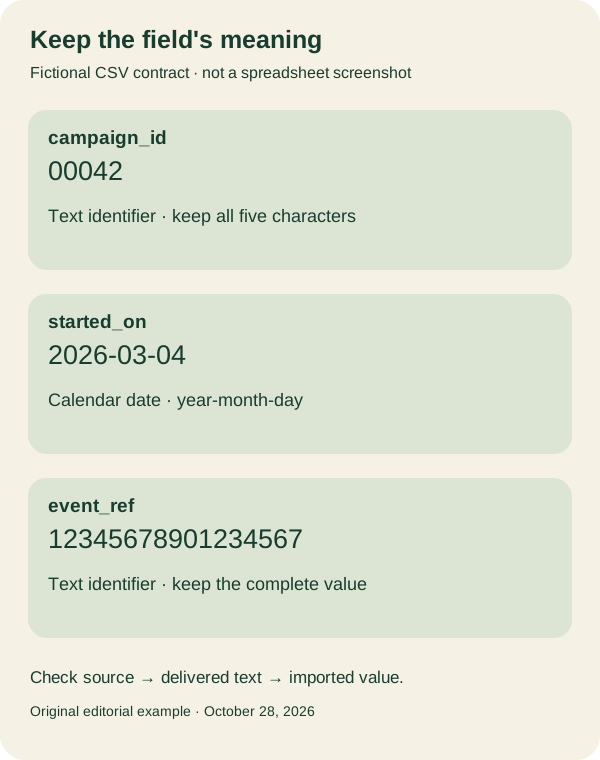
Do not hide missing information behind a plausible format. If the source does not establish a timezone, an export cannot manufacture one. If a field is sometimes blank, record what the blank means for this dataset rather than quietly replacing it with a zero or a date that happens to parse.
Inspect the delivered file and the import as separate steps
Keep an unchanged copy of the export. Open a small permitted sample in a text editor or another tool that shows its literal field values. Find the same recognizable record that you inspected in the source. Compare the identifier characters, the date value, the column names and the number of fields before deciding that the exporting application is responsible.
Next, inspect how the receiving application reads that file. Microsoft's text and CSV import documentation distinguishes directly opening a file from importing it with controls for interpretation. Use the relevant instructions for your supported application and version, and inspect the preview before loading the full dataset.
For an identifier column, check that the import treats its values as the intended text. For dates, confirm the order and intended type. Examine the resulting values as well as the visible formatting. A cell that looks shortened may need a closer check; a neat display is not evidence that every original character survived.
Do not test on a sensitive customer export merely because it is convenient. A small synthetic sample can exercise your proposed column contract without copying actual addresses, account information or private campaign details into screenshots or a third-party tool. Test the authorized production path separately when you need to establish what the real exporter delivers.
Our sample is an illustration to adapt. It is not a claim that we opened Excel, tested every importer, verified a customer's export or proved an analytics event arrived. If you run the check, record the actual application, version, settings and result. Keep an untested step labeled as untested.
The UK government's CSV guidance also emphasizes consistent columns, headers and validating how the receiving application interprets the data. Its government publishing context is different from a founder's campaign report, but the practical handoff question is useful: can the recipient understand and correctly use the fields you sent?
Leave a reproducible handoff record for the next export
Write down enough information for another person to repeat the same check without receiving your entire working dataset. The export name alone is rarely sufficient; a report generated after a configuration change may carry a familiar name but different contents.
Use this record for one permitted sample. Replace the example labels with your own column contract and actual observations:
Source report and export time:
Delivered file name and unchanged-copy location:
Identifier columns and expected characters:
Date columns, order and timezone if applicable:
Receiving application, version and import choices:
Recognizable sample row and observed result:
Unverified steps or remaining differences:
When a difference appears, preserve both observations. “The text file contains 00042; the imported cell contains 42” is a useful boundary to investigate. “The report is broken” does not identify the step to repeat. Conversely, if the delivered file already lacks a character, changing the spreadsheet's display cannot establish that the original export was complete.
Share the field explanation where the recipient will find it. A short adjacent note, a companion description or a clear export screen can identify text columns and date conventions. Do not bury the only explanation in an internal conversation that the next recipient cannot access.
Keep this check distinct from counting campaign outcomes. Our campaign measurement guide follows the path from a campaign link to a defined action. A well-formed exported row does not establish that the underlying event was recorded correctly or that the campaign caused a result.
Finish with one repeated comparison after a change: source record, delivered field and imported value. That gives a small team an explainable export handoff without turning a spreadsheet's appearance into a claim about the whole reporting system.
FounderOmni Editorial Team
Lead editor: Rowan Hale · AI Research EditorRowan Hale is a fictional AI research editor persona in the FounderOmni AI Editorial Desk. He checks sources, claims, and evidence trails. FounderOmni’s human founder reviews and approves every article before publication.