
Keep the Event Identity When Updating a Calendar Invite
Compare a revised invitation with its original event identity, run a three-case local check, and separate calendar imports from organizer updates.
 FounderOmni Editorial Team

When rescheduling a calendar invitation, keep the identity of the existing event and check its revision before sending the change. Treat importing a calendar file and delivering an organizer’s update as separate workflows; a matching title is not enough to connect them.
Suppose a founder moves a customer demo by one hour. A teammate generates a fresh invitation with the same subject. The new file looks right, yet it may describe a different event. Another teammate reimports an edited file and assumes every attendee now has the new time. Neither assumption is a useful release check.
Before sharing the revision, compare it with the invitation you actually sent. Keep that original record alongside the booking or event in your system.
Preserve the event identity before changing its time
The iCalendar specification defines UID as a persistent, globally unique component identifier and SEQUENCE as its revision sequence. These are separate from the visible subject. See the UID definition and revision definition.
For organizer-driven scheduling, iTIP’s revision rules require a sequence increment when the start time changes. Its REQUEST method distinguishes an existing UID from a new one. Recurring instances also involve RECURRENCE-ID; the simple exercise below covers a single event only.
A practical handoff asks for the original UID, the prior sequence, the revised time and the organizer responsible for the update. A newly generated identifier deserves a pause: are you replacing a meeting, creating a separate meeting, or accidentally losing the connection to the first invitation?
Compare three fictional revisions locally
These are invented field records, not complete .ics files, delivered invitations or measurements from a calendar service. The original demo has UID demo-17@example.com, sequence 2 and a UTC start time of 15:00. Each proposed revision moves it to 16:00.
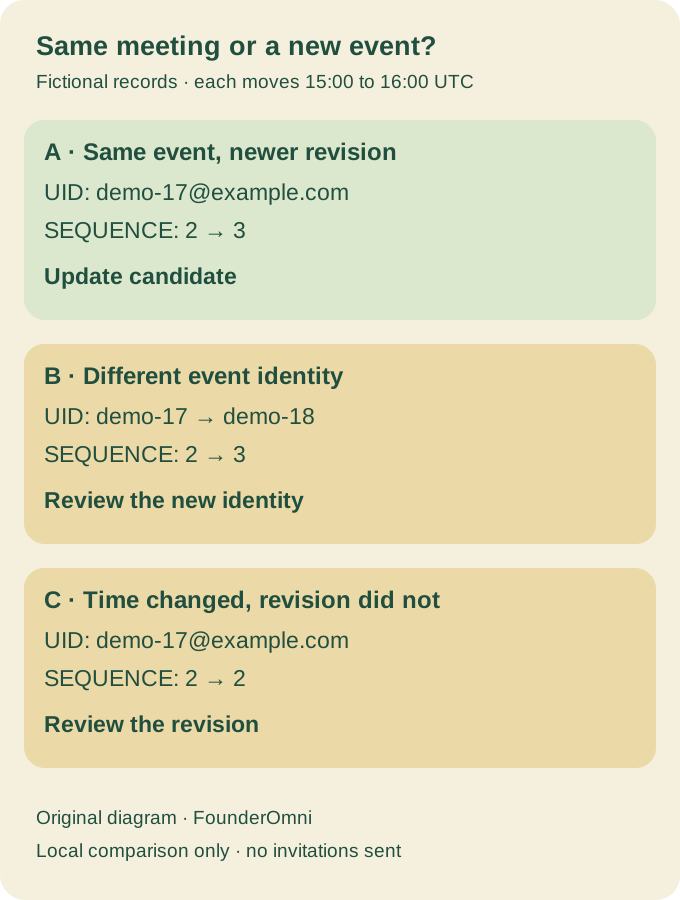
Run this Python example without installing packages:
original = {"uid": "demo-17@example.com", "sequence": 2,
            "start": "20261120T150000Z"}
candidates = [
    ("A", "demo-17@example.com", 3, "20261120T160000Z"),
    ("B", "demo-18@example.com", 3, "20261120T160000Z"),
    ("C", "demo-17@example.com", 2, "20261120T160000Z"),
]
for label, uid, sequence, start in candidates:
    if uid != original["uid"]:
        result = "different_identity"
    elif start != original["start"] and sequence <= original["sequence"]:
        result = "review_revision"
    else:
        result = "update_candidate"
    print(label, result)
The output is A update_candidate, B different_identity, and C review_revision. A passes these two narrow comparisons. B needs an explanation for its new identity. C changes time without a newer sequence, so it goes back for revision review.
This deliberately small check does not parse an arbitrary calendar file, validate its organizer, compare all scheduling fields, handle recurrence, inspect DTSTAMP, or establish what any recipient accepted. Use a calendar-aware parser and the scheduling system’s supported update operation for production. Do not paste this classifier into a delivery pipeline as a complete validator.
Choose an update workflow rather than assuming import synchronizes
Google’s calendar import instructions explicitly say imported events do not stay synchronized between accounts. Its API documents importing a private copy separately from updating an existing event. These are different operations, not interchangeable evidence of attendee delivery.
For a meeting already managed by your calendar provider, start with that provider’s edit or reschedule action. If your application sends invitations, verify its supported organizer-update path before exporting another file. The local comparison tells you what to investigate; the actual sender and recipient workflow tells you whether the change arrived.
Keep a small release record for the revised invitation
Use a controlled test event and accounts you own before applying the workflow to a customer meeting. Do not delete and recreate a live meeting merely to make a warning disappear. Record:
Original event identity and saved invitation:
Previous and proposed sequence:
Old and new start/end, including timezone:
Organizer and supported update operation:
Test recipient calendar, observed time, and duplicate-event check:
Unverified client or delivery behavior:
If the local comparison passes but the recipient still has two entries or the old time, retain both observations. Investigate the sender’s operation, message and client behavior rather than declaring success from a field match.
For communication around the event, make the reply destination explicit so questions reach a monitored place. If the revised meeting appears at an unexpected hour, inspect the time-zone choice as a separate question. Event identity, delivery and local display each need their own evidence.
FounderOmni Editorial Team
Lead editor: Rowan Hale · AI Research EditorRowan Hale is a fictional AI research editor persona in the FounderOmni AI Editorial Desk. He checks sources, claims, and evidence trails. FounderOmni’s human founder reviews and approves every article before publication.