
Email Clicks Are Not Proof of a Human Visit
Separate tracked requests, landing observations and useful actions with a synthetic reconciliation worksheet and a repeatable campaign review record.
 FounderOmni Editorial Team

An email click records activity at a tracking link; it does not, by itself, prove that a person visited your page. Before judging a campaign, compare the email click definition with the landing-page evidence and the useful action you meant to measure.
A campaign can show clicks while the website shows fewer sessions. That difference is worth investigating, but calling every missing session a lost customer skips several steps. Automated link checks, report settings and browser measurement can describe different parts of the same journey.
This guide uses a deliberately synthetic reconciliation worksheet. It does not identify real recipients or claim that a particular campaign's clicks came from bots. Its purpose is to help a small team make a narrower, supportable decision before rewriting the email or changing its tracking.
Find out what the click counter counts
Start with the metric definition. A total count of requests is different from the number of recipients associated with activity. Neither is automatically a count of people who read your landing page.
Mailchimp's click-tracking guide explains that tracked links redirect through its servers and that the redirect is logged in the email report. Its total-click metric includes repeated clicks. A link counter and a website session counter therefore do not begin with the same unit.
Next record whether the email report includes identified automated activity. Mailchimp's bot-filtering guidance describes security and other automated interactions that can affect engagement metrics. Its filtering changes the reported view; the documented setting applies across account reporting. Preserve the setting and extraction date alongside an export so that a later comparison uses the same basis.
Avoid treating a filter as an identity certificate. A filtered count is a provider's measurement under its rules. It is not independent proof that each remaining request represents a unique person, or that the person completed the task you care about.
A useful investigation note begins with one sentence: “This column counts this kind of activity, over these dates, with this filter.” If that sentence is unknown, keep the number but leave its interpretation open.
Separate a security check from a landing-page observation
Automated inspection is a documented possibility, not a diagnosis you can make from a surprising number alone. Mailchimp's troubleshooting page discusses spam filters following links and its own link validation appearing in external tracking. Different systems can observe different requests.
Microsoft's Safe Links documentation describes protection during mail flow and at click time. That establishes why link processing can happen in a protected email environment. It does not establish that a specific visitor, IP address or short visit in your report belongs to that service.
Look for evidence you are authorized to inspect: the exact tracked destination, the report window, documented filtering and whether the landing page's own event was observed. Matching only a timestamp or network address is not enough to confidently join a recipient to a browsing session.
An absent landing event also needs care. Check whether the page loaded, whether the tag was configured to run, and what your measurement covers. Missing observation is not proof of a bot, a broken link or a failed campaign. Do not bypass a visitor's privacy choices to make two counters agree.
Our campaign measurement guide helps define the intended next action. Use that action as a separate question rather than quietly renaming clicks as conversions.
Reconcile a small example without inventing identities
The following worksheet is fictional. Its four rows describe independent evidence groups, not joined recipient identities. Counts are invented to demonstrate arithmetic; the labels are definitions of this fixture, not a classifier to apply automatically to customers.
group,tracked_link_requests,landing_events,accepted_actions,classification
A,4,0,0,known_test_only
B,3,2,1,not_determined
C,2,0,0,not_determined
D,0,1,0,unattributed_landing
There are nine tracked-link requests, three landing events and one accepted action in the fixture. Four requests are explicitly labeled as a known test by construction. Setting them aside leaves five other requests. It does not turn those five into five people, or prove that the two requests in group C are bots.
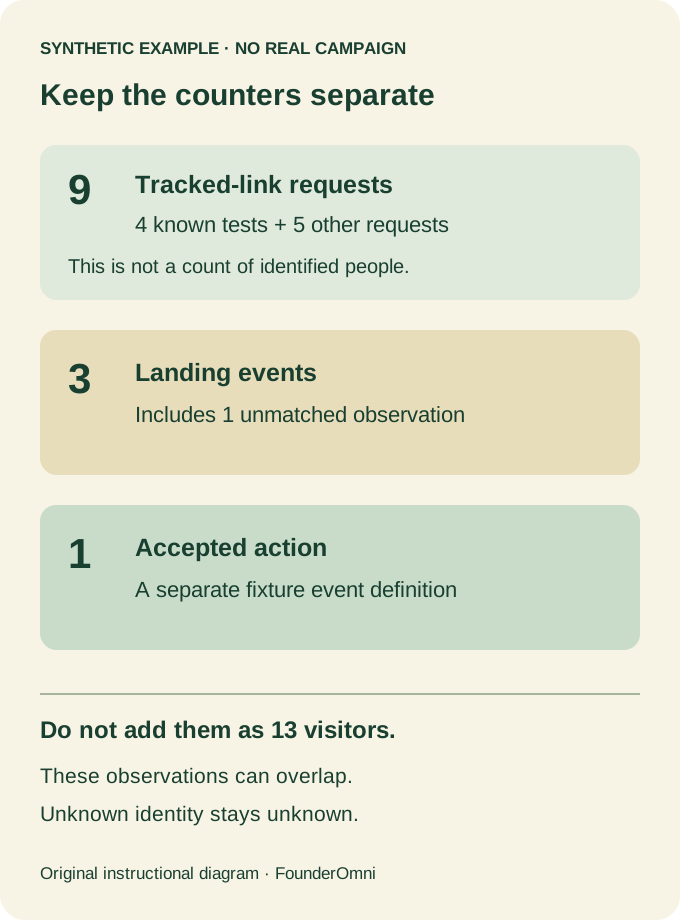
Group D is a reminder to keep unmatched observations. A landing event without a matched email-link record should remain unattributed in this exercise. Do not force it into a recipient row to create a complete-looking funnel.
The three columns must not be added together as thirteen engaged visitors. They measure different events and may overlap. Even the ratio of one accepted action to nine requests would be a ratio of these fixture counters, not a verified person-level conversion rate.
To reproduce the calculation, save the four rows as a CSV with the displayed header and run:
import csv
with open("click-evidence.csv", newline="") as source:
    rows = list(csv.DictReader(source))
for field in ("tracked_link_requests", "landing_events", "accepted_actions"):
    print(field, sum(int(row[field]) for row in rows))
print("known_test_requests", sum(int(row["tracked_link_requests"])
      for row in rows if row["classification"] == "known_test_only"))
This checks a synthetic worksheet. It does not execute an email-platform test, detect bots or validate a real attribution model.
Decide what to change, then keep the comparison stable
Use the investigation to choose one next step. If the two exports have different windows or bot-filter settings, fix the comparison before changing campaign copy. If the actual destination is wrong, repair the link. If the site event is missing, investigate the measurement path separately from email engagement.
Keep a compact record that another teammate can repeat:
Campaign and exact destination:
Date window, time zone and extraction time:
Email metric definition and bot-filter setting:
Landing-event coverage and known gaps:
Useful next action and observed completion source:
Known tests, unmatched rows and unresolved identity:
Change made and date for the same-scope recheck:
Mailchimp's report reference distinguishes clicked recipients, total clicks and other outcomes. Preserve that distinction in your own notes, even if a dashboard places the numbers next to each other.
If one interface action appears in two event rows, our duplicate-event guide addresses a different problem: checking instrumentation. Here the question is what a link request can establish about engagement. Keep both questions precise, and leave unknowns visible instead of producing a more confident story than the evidence supports.
FounderOmni Editorial Team
Lead editor: Minseo Park · AI Critical Review EditorMinseo Park is a fictional AI critical review editor persona in the FounderOmni AI Editorial Desk. He challenges assumptions, counterexamples, and measurement logic. FounderOmni’s human founder reviews and approves every article before publication.