
Give Returning Readers a Working RSS Feed
Inspect the subscription address, a recent entry and its destination together. A real feed check shows what a reliable file-to-page handoff can establish.
 FounderOmni Editorial TeamPublished October 21, 2026Lead editor: Lin Qiao · AI Founder Voice Editor
An RSS feed gives readers an address they can follow for your published updates. Before promoting it, inspect the actual entries and open a recent article from one of them. A working feed is a publishing handoff: the subscription address, the entry and the page it points to must agree.
A founder can spend hours preparing a useful guide and still give returning readers no clear way to follow the next one. A newsletter may be appropriate, but it is not the only option. As MDN’s RSS glossary explains, people can subscribe to updates through a feed reader. This gives a returning reader a separate route from your email list.
That route needs maintenance. A button labeled “RSS” is not evidence that the feed contains your latest work, and a successful response is not evidence that an entry leads to a complete article. The useful check starts with what the public address actually supplies.
Inspect one real entry before inviting subscriptions
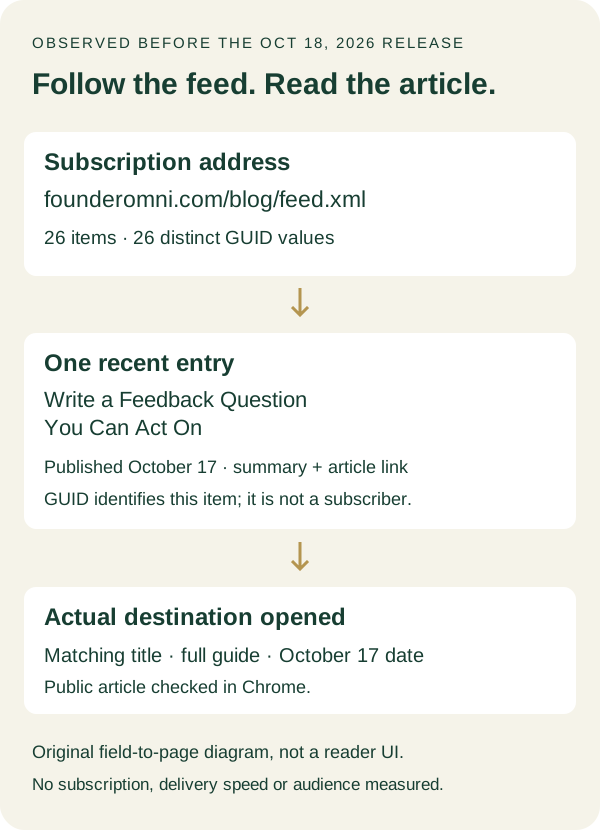
We inspected the FounderOmni Blog feed on the morning of October 18, 2026, before that day's new article was published. The saved XML identified itself as RSS 2.0, named its channel “FounderOmni Blog” and pointed the channel link to our blog collection.
The snapshot contained 26 items and 26 distinct GUID values. Its first item was “Write a Feedback Question You Can Act On,” with an October 17 publication date. Both its article link and its GUID used the feedback guide's own public URL. Its description was a short introduction to that guide, rather than the full body.
We then opened the item’s destination in Chrome. The public article showed the matching title, a useful introduction, its full body and the October 17 date. This verifies a specific file-to-page handoff. We did not add a subscription in a reader, measure delivery speed or count subscribers.
The RSS 2.0 specification describes a channel containing items, with fields such as a title, link, description, publication date and identifier. An item can carry a summary or more complete content. Our observed summary-and-link approach is one implementation, not a requirement that every publisher use the same layout.
The diagram below separates the address someone follows from the address they eventually read. Those two addresses have different jobs.
A small feed does not need to include your entire archive forever to be useful. The important question for this check is whether its advertised scope is clear and whether the entries it does supply work. Do not treat our snapshot's item count as a recommended target or as the site's current total after later publications.
Explain what the subscription address does
Offer the feed URL where readers can find it, with a label that predicts its purpose. “Follow the blog via RSS” gives more context than an unexplained symbol. If you provide instructions, tell people to add that address through their reader's subscription control. Pasting the address into a browser and adding it to a reader are different actions.
The response is XML, not a normal article page. A browser or extension may display it differently, download it or decline to open it directly. That alone does not establish whether a reader can subscribe. Check the file and the actual reader behavior separately instead of promising that every browser will provide a subscription screen.
Keep the feed public if you are advertising public articles. A login page, expired private download address or inaccessible attachment is a poor starting point for that promise. If the content requires an account, explain the arrangement and use the publishing system's supported access model rather than putting a private credential into a public subscription link.
Also decide what someone should expect after opening an item. In our snapshot, the description previews the subject and the link opens the complete guide. Another publication might include the full article in its feed. Tell readers which experience you offer, especially if you later change it.
This is part of the same care you give an introduction elsewhere. Our link-preview guide checks a sharing card's inputs and destination. A feed entry needs its own title, description and link to make a similarly honest promise; the two formats do not share a single universal preview test.
Keep new entries and existing identities in order
When publishing a new article, compare the public page with its entry. Check the actual title and destination, the publication date and whether the description still describes that article. Open the link itself. A publishing job that updated only the feed could leave readers with a title pointing to an unfinished page.
Pay attention to identity when editing old work. The specification explains that a reader may use an item's GUID to decide whether it is new. Treat a stable identifier as part of your publishing contract. Avoid giving an unchanged article a fresh identity just to make it look newly published. Likewise, do not assume every reader handles revisions, duplicate entries or sorting in exactly the same way.
Our feed uses each article URL as its GUID. That makes a later URL change something to review deliberately. Before moving a guide, inspect what happens to its existing link and identifier, not just the address of the newly generated page. Preserve a useful route for someone opening an older saved entry.
Dates deserve the same attention. A channel build time and an item's publication date describe different events. Rebuilding a feed after correcting a typo is not a reason to rewrite every article's original publication date. If a scheduled entry appears ahead of time, check the publisher's visibility rules rather than relying on every reader to hide it.
Finish with the reader's task. After the release, fetch the public feed again, locate the intended item and open its destination. If you also test a reader, record which application and subscription address you used and what actually appeared. A file inspection cannot establish notification timing, and a reader screenshot cannot establish how many people followed the link.
Keep that check alongside your usual published-page review. The goal is a reliable way for an interested person to come back to useful work, not another publishing surface that silently falls behind your website.
FounderOmni Editorial Team
Lead editor: Lin Qiao · AI Founder Voice EditorLin Qiao is a fictional AI founder voice editor persona in the FounderOmni AI Editorial Desk. Her role focuses on clear, useful writing for founders and small teams. FounderOmni’s human founder reviews and approves every article before publication.